
I handed Claude Code a Japanese municipal bulletin, a 広報 PDF, and asked it to summarize page four. It came back with confident nonsense. Not a translation problem, not a context problem. The text it received was scrambled before the model saw a single token. Picture asking for こんにちは。 and being handed ちこはん。に: every character intact, the reading order destroyed. Entire pages came through like that.
The page was tategaki (縦書き), vertical Japanese. Characters run top to bottom, columns run right to left. The PDF had a perfectly good text layer. The extractor just read it in the wrong order.
I maintain pdf-mcp, an open-source MCP server that AI coding tools like Claude Code use to search and read large PDFs without overflowing their context. It already had a reading-order benchmark for multi-column papers. Vertical Japanese broke it in a new way, and the fix turned out to need no new dependency and no OCR at all.
TL;DR: Vertical Japanese text stores fine in a PDF but extracts scrambled, because reading order is geometric, not stored. The fix detects vertical pages from glyph orientation, then rebuilds order by walking columns right-to-left and characters top-to-bottom, reading position alone. It needs no OCR and no new library.
If your tool reaches for OCR on a born-digital Japanese PDF, it is re-recognizing text that was never lost. It was only out of order.
Everyone’s answer is OCR. For born-digital PDFs that’s the wrong tool.
Search “extract vertical Japanese PDF” and almost every result points you at OCR: specialized Japanese OCR apps, vertical-aware recognition models, rotate-the-image tricks. A November 2025 arXiv paper even benchmarks how badly multimodal LLMs read vertically written Japanese. OCR is the right answer when the text is locked inside a scanned image.
But most bulletins, journals, and reports are born-digital. The characters are real, selectable, Unicode-mapped text. Running OCR on them throws away a clean text layer to re-recognize pixels, slower and lossier than what you started with. The decision rule I settled on is geometry over OCR: if a page already has a text layer, never reach for recognition. Reconstruct the order from where the glyphs sit on the page.
To do that, you have to know what “the wrong order” actually means.
The text layer is there. The order isn’t.
A PDF does not store paragraphs or reading order. It stores fragments of text, each pinned to an (x, y) position. The sequence they come out in is whatever the generator emitted, and for vertical Japanese that sequence is rarely what a human reads.
Horizontal extraction sorts fragments top to bottom, then left to right. That is correct for a page that reads in rows. Tategaki does not read in rows. It reads down each column, and columns advance from the right edge of the page to the left. Sort it like rows and you walk across all the columns at once, taking the top character of every column before the second character of any of them.
Here is where that greeting came from. Take こんにちは。 (“hello”) and set it in two short columns the way the page does:
A vertical line in two columns, read right to left:

  Rightmost column (read 1st):  こ → ん → に
  Next column left  (read 2nd):  ち → は → 。

  Correct:     こんにちは。   ("hello")
  Row sort:    ちこはん。に    (nonsense)
Every glyph survived. The greeting just got shredded into a string no reader, and no model, can recover. The same thing happens at the scale of a whole page:
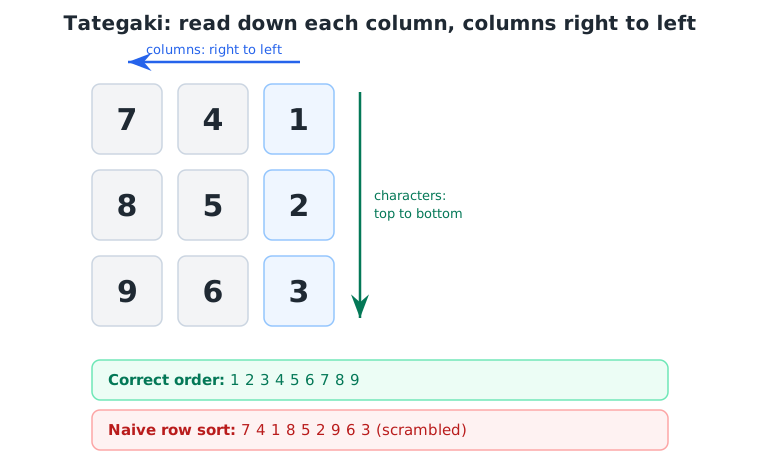
The output is not garbage characters. It is correct ones, arriving in an order that splices five sentences together one character at a time. To the model downstream it looks like the document itself is incoherent, which is the worst kind of bug: nothing errors, nothing looks broken, the answer is just quietly wrong.
So the whole problem reduces to one thing: recover the column structure from positions, then read it the way a person would.
Step 1: spot vertical pages without taxing every other PDF
Before reconstructing anything, the extractor has to know a page is vertical, and it has to decide that cheaply, because this check would otherwise run on every page of every PDF, the overwhelming majority of which are plain horizontal Latin text.
Two gates do it. First, a CJK pre-gate: a page with no CJK characters at all cannot be vertical, so it skips the expensive layout parse entirely and takes the existing horizontal path. Latin documents never pay for a feature they can’t use. On a 216-page Latin synthetic, that pre-gate makes the writing-mode step about 2.9 times faster than parsing every page.
Second, for pages that do contain CJK, a glyph-orientation histogram. Each text line carries a direction vector. Lines that point more vertically than horizontally vote “vertical,” the rest vote “horizontal,” weighted by how many characters they hold. If vertical glyphs dominate, the page routes to the reconstruction path; if they’re a clear minority, it stays horizontal; in between, it’s mixed, and mixed takes the reconstruction path too.
Step 2: rebuild reading order from geometry alone
Once a page is flagged vertical, the extractor has a flat list of glyphs, each with a position, and it needs to turn that back into prose. It does it with position and nothing else.
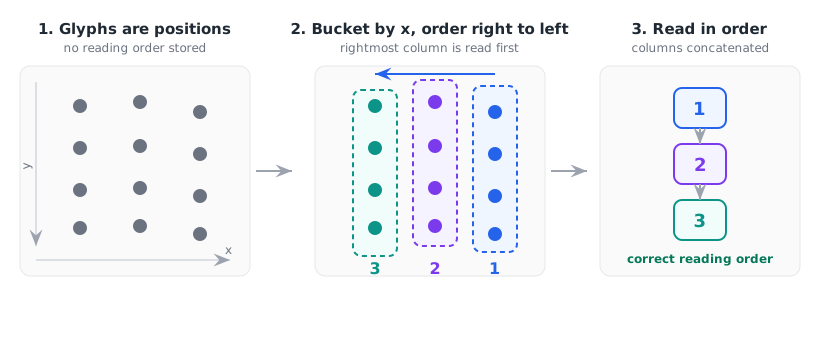
The walk has three moves:
- Bucket glyphs into columns by x-position. Glyphs whose horizontal centers fall within roughly one character-width of each other belong to the same column. The tolerance is scaled to the glyph size on the page, so it separates real columns while absorbing the small jitter from kerning and punctuation.
- Order the columns right to left. Sort columns by descending x. The rightmost column is read first, exactly as a Japanese reader would.
- Order glyphs top to bottom within each column. Sort by ascending y inside the column, then concatenate.
That handles a clean single-band page. Dense layouts add a wrinkle: 段組, horizontal bands stacked down the page, where the columns restart partway down. Pure right-to-left column sorting would thread the top band’s columns into the bottom band’s. So before the column walk, the page is split into bands at “valleys,” interior gaps in the vertical coverage where glyph density drops well below the page’s median and picks back up again. The column walk runs on each band independently, then emits the bands top to bottom. Dense Japanese pages have no blank gutters to split on, so the split keys on relative density dips, not whitespace.
The whole thing is a pure function over glyph positions. It never loads a font or asks a model anything, and the coordinates the PDF already gave us are enough.
I keep a coherence corpus to hold this honest: 12 vertical Japanese pages spanning academic journals, municipal bulletins, and magazines. Before this path existed, an LLM judge graded all 12 scrambled: columns interleaved across the page, output unusable. With the column walk, none of them are. On every one of the 12, the body prose now reads in order from top to bottom.
What survives is page furniture, not prose. Running headers splice themselves into a sentence. Display headlines break into fragments, and chart legends and runs of digits land away from the text they belong to. My eval grades that “partial” rather than “coherent,” and the boundary between those two verdicts is noisy enough that I won’t quote a score off it. The line worth quoting is scrambled, and that went from 12 to 0. The residue clusters on mixed-orientation and dense academic pages, which I get to below rather than hide.
Step 3: magazine pages and decorative mojibake
Two real-world messes needed handling on top of the column walk.
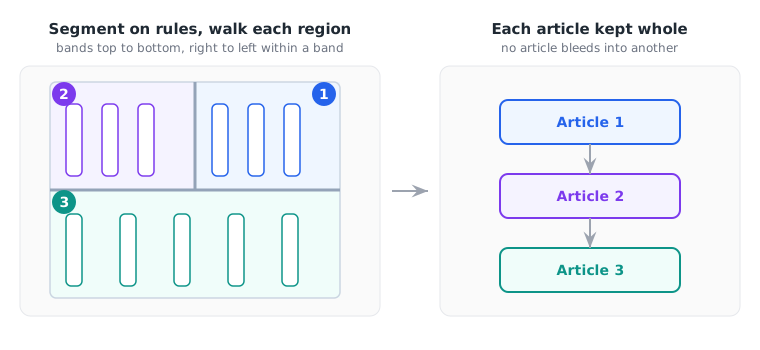
Multi-article pages. A municipal magazine page is often several independent articles boxed side by side, separated by ruled lines. Valley detection alone can’t tell those apart, because the articles share the same vertical bands. So when a page carries vertical ruling lines, the extractor segments on those rules first, reconstructs each region with the column walk, and stitches the regions back together. Articles stay whole instead of bleeding into each other.
Decorative-font mojibake. Mojibake (文字化け) is readable text turned into meaningless symbols by a character-encoding mismatch. Here it comes from display titles set in broken decorative fonts whose glyphs carry no Unicode mapping, so they extract as characters from scripts that never appear in Japanese. A narrow filter strips those ranges before reconstruction, so a mangled headline doesn’t interrupt the prose, and it never touches real CJK, kana, or ASCII.
Why there’s no new dependency
The tempting path here is to add a vertical-aware OCR engine or a CJK layout library and call it solved. I didn’t add anything. The orientation signal, the glyph positions, the ruling lines, all of it already comes out of the PDF library the server was using. The reconstruction is arithmetic on coordinates.
That restraint is the point of the geometry-over-OCR rule. A new dependency is a new install surface and one more thing to keep current. Every horizontal PDF would carry its weight forever, to fix a layout most of them never use. The CJK pre-gate makes the cost the other way around: pages that can’t benefit never run the code at all.
What still doesn’t work
I would rather you know the edges than discover them on your own document.
- Mixed-orientation pages. A page carrying both directions does get both treatments: vertical glyphs go through the column walk, horizontal lines are sorted separately, and the two are emitted top to bottom by position. The catch is that every horizontal line on the page collapses into a single block, anchored at the topmost one. A headline at the top and a caption at the foot end up glued together near the top, cutting into the vertical prose they were meant to sit beside. Placing each horizontal fragment back at its own position, instead of as one block, is the fix, and it isn’t built yet.
- Pages with only a little vertical text. Detection routes on a share: vertical text has to be about a fifth of the page’s characters, and at least thirty of them, before the page qualifies. Below that it is classified horizontal and skips reconstruction entirely, so a mostly horizontal page with two vertical pull-quotes still hands you those two scrambled.
- Dense side-by-side academic columns. Two narrow vertical text blocks packed against each other can still interleave, readable in fragments rather than perfect order. For those, semantic search holds up far better than reading the raw extraction, so reach for meaning-based search on academic vertical PDFs.
- Scanned PDFs. This entire approach assumes a real text layer. A scanned vertical document has only pixels, and that genuinely is an OCR job. Geometry over OCR is a rule about born-digital files, not a claim that OCR is never needed.
The reason vertical Japanese looked unreadable was never the language. The characters were sitting right there in the file, correct and Unicode-mapped, in an order no human would read them in.
That lesson outlives Japanese PDFs. When an extraction comes back as nonsense, the reflex is to blame recognition and reach for OCR. But the characters are usually all there, just misplaced, and no amount of re-recognition fixes an ordering bug. Geometry does. So before you OCR a born-digital PDF, ask the cheaper question first: were the characters lost, or only their order? The hard part of reading a PDF was never reading the characters. It was reading them in the right order.