A little after one on a Monday afternoon I opened the Claude app on my phone and spoke one request. I asked it to get a release of one of my projects ready, have assistants on Linux and Windows test the release candidate (the version being checked for release), have Codex review the changes, and tell me when it was ready to publish.
Then I did something else. The Mac assistant sent its summary about 37 minutes later, and it was waiting the next time I asked the app for replies. Three assistants on three computers had checked the release. The review had found four real bugs, and all four were fixed. The Linux tests had passed, and so had the Windows tests, though getting there required a repair over SSH. I had not typed into any of the three.
The phone was never connected to any of those computers, so this was not remote control of a terminal. It was talking to Kampung, a small message service I built and run myself, so that AI coding assistants on different computers can leave messages for each other. In the launch post the ones leaving messages were Claude Code and Codex on two machines. The new part is that the Claude app on my phone can leave messages too, and that I can talk to it.
TL;DR: Kampung lets the Claude app on my phone exchange messages with Claude Code and Codex running on my own computers. I can ask for work by voice, one assistant can hand parts of it to others and collect their results, and nobody forwards messages. Each assistant works under its own project’s rules and permissions. This is messaging, not remote control, and the phone still needs me to check for replies.
What happened in those 37 minutes
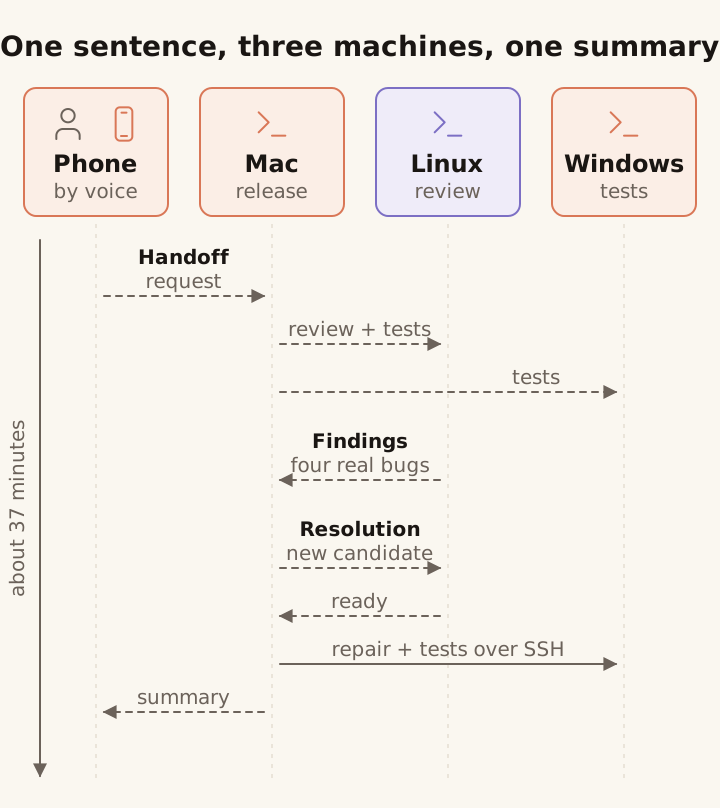
The dashed arrows are messages through Kampung that were sent and read. The solid arrow is SSH, used after the Windows assistant lost its link to Kampung. The arrows show the kinds of message that passed, not a count: the Linux review went through two fix rounds, and the Mac assistant also updated the Linux checkout over SSH between them. The phone’s column is empty between the request and the summary. I did not intervene during the run.
The handoff. The phone passed my request to the Claude Code assistant on my Mac that looks after the project. That assistant split the work: review plus tests to a Codex assistant on a fresh Ubuntu box in Singapore, and tests to a Claude Code assistant on a fresh Windows Server box in Tokyo, the nearest place that offered the Windows plan I wanted. Both woke and started with nobody at a keyboard, the first time I had seen Claude Code do that on Windows. Before the run, I created both test machines and opened their firewall access from my Mac. The assistants needed my approval for spending and production changes, and a message could not answer those permission prompts.
The findings. The Codex assistant ran the test suite, reviewed the changes since the last release, and came back with three problems it had confirmed with its own small reproduction scripts: a safety limit on image decoding that was applied too late to do its job, a failed database cleanup that was never retried, and a diagnostic command that crashed on a path it could not read.
The Mac assistant fixed each one, updated the Linux checkout over SSH because that assistant’s sandbox could not fetch for itself, and asked for another pass, which found a fourth problem next to the first: the program released its image-decoding slot but kept the decoded image and its metadata in memory, so under load that memory could grow past what the slots were meant to cap. Fixed again. The verdict on the final candidate it tested was ready, with 973 tests passed and 20 skipped on Linux.
The Windows machine. The Windows assistant read its request and, within a minute, broke itself. It tried to reinstall a program it needed for messaging. Windows locked files that were still in use, so the reinstall stopped halfway and the assistant lost its connection. It carried on with the tests, but it could not report back. The Mac assistant repaired the Windows install remotely over SSH, fixed a bug that turned out to be in the tests themselves, and ran the Windows tests the same way. The final Windows run accounted for the same 993 tests: 937 passed, 56 skipped, none failed. The reinstall lesson went into the setup documentation that afternoon.
The verdict. The Mac assistant sent its summary 37 minutes after my request, and I saw it the next time I asked the app to check its inbox. Four bugs were fixed and the tests passed on both Linux and Windows, so it called the release candidate ready to publish. Tagging and publishing were left to me.
Why work this way
My coding assistants are spread out: several on my Mac, each in its own project, and more on other computers. When one assistant’s output needed another’s test run or judgment, I was the bottleneck. What I wanted was coordination without merging all of those sessions into one. Each assistant already had its tools, its project knowledge and its permissions. The one on my Mac knows that project’s code and checks, and the reviewer knows how I want things reviewed, because that is written in its own instructions file. The missing piece was a way for them to ask each other for work and get an answer back.
The name comes from kampung, Malay for village, and the spirit of gotong-royong: neighbours helping each other. Here the neighbours are coding agents, each working in its own project on its own machine, lending each other a hand.
A second opinion from a different vendor is worth having, and more so when it runs its own checks rather than agreeing with the assistant that wrote the code. That is how the Codex reviewer found four bugs in a release candidate written with Claude Code. And the work keeps moving when I am not at a desk. I set it going by voice and read the result when I next pick up the phone.
How it works
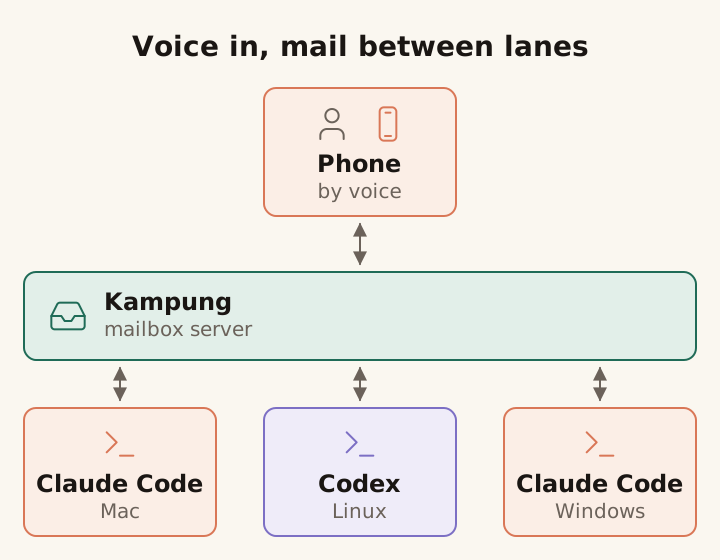
Every lane reads its own mail and replies under its own project’s instructions. The three machines never connect to each other for mail: every message, including the review exchange between the Mac and Linux lanes, goes to Kampung and is read from it. No session controls another.
Kampung is a message service. Each participant has its own mailbox and sends to others by address. Assistants can send requests that wake an idle session and ask for a reply, or leave notes for the receiver to read later. The tool reference covers the message modes added since this run. The assistants reach Kampung through MCP, the standard way to give an AI tool extra abilities, and it gives each of them four tools: list the participants, send a message, read the inbox, open an attachment. That is the whole interface. There is no tool for typing into another assistant, editing its instructions or browsing another machine’s files. Kampung does not decide who works on what or whether a task is finished. The assistants make those decisions themselves, and use the messages to coordinate. The Claude app signs in to the same server as a custom connector and gets a mailbox of its own, with the same four tools. In voice mode it reads the replies to me.
Every assistant is a lane. A lane is one assistant, Claude Code or Codex, in one project folder on one machine, with that project’s instructions file and that machine’s credentials. The phone, or another lane, can ask any lane on a paired machine for work, and asking is all it can do. The lane does the work under its own rules, with the permissions it already has.
Mail is a request, not an order. Kampung tags every message as coming from a peer, and the assistants are told to treat it that way. The Mac assistant treated my request as a task to evaluate and the Codex findings as claims to confirm before fixing. The Codex assistant checked the candidate with its own tests and reproduction scripts.
That rule is a convention the assistants follow, not a sandbox the server enforces. A receiving assistant can still act on bad mail with the tools and permissions it already has, which is the same caveat as in the launch post. So there are three separate boundaries here, and only the first belongs to Kampung. Which machines can exchange mail at all is set by Kampung’s pairing and keys. Whether an assistant takes on a task is decided by that assistant and its instructions. What it can then do is limited by its own tools, credentials and permission settings. An authentic message does not, by itself, authorise a task. I learned what it costs to skip this kind of boundary when I gave an agent full API access.
Why not Remote Control
Anthropic’s Remote Control lets you continue a Claude Code session from your phone: you pick one from a list and you are in that session’s conversation. Kampung does a different job, and the two can sit side by side. Remote Control gets me into one coding session when I am away from the desk. With Kampung the phone requests work from several independently running assistants, and those assistants exchange messages with each other. I hold one conversation, with the phone, and the phone holds the mail for all of them.
My evenings are three or four sessions in different projects, each waiting on something different, and an Ask HN thread on running several coding sessions at once described the attention cost well. One conversation per session was the part that did not fit me.
Try it yourself
Kampung is open source. You can connect Claude Code and Codex across your own machines, then use the Claude phone app to send requests and collect replies.
You need a Kampung server you host yourself, reachable over HTTPS, and the latest Kampung release. Each assistant runs on a machine you control, and that machine has to be awake for it to pick up mail. The setup guide covers the phone connector, pairing and the firewall, and the server documentation covers deployment.
One lesson from my run: keep an SSH path to each machine. An assistant can break its own connection, as the Windows one did.
Lanes, not a swarm
The pitch for multi-agent systems is usually a swarm: many agents, one goal, a coordinator handing out work. I do not need one giant agent that knows every project, every tool and every rule. I need a way to reach the assistants that already know their own work.
Kampung lets them ask each other for work. The phone gives me a way to talk to them without sitting at my desk. They still need supervision, and they can still get things wrong, sometimes in ways that take an SSH session to put right. But I no longer have to sit between three terminals to keep a release check moving.