When an AI agent misreads a phone-scanned PDF, the standard advice is to run OCR first. That advice fixes the wrong layer. On my stack the resolution was destroyed before any reading happened, human or machine: the tool serving the page had silently downsampled it to 72 DPI to fit a response size budget, and nothing in its response admitted that.
I build and run pdf-mcp, an open-source MCP server for PDF reading that Claude Desktop and Claude Code use for search, extraction, and page rendering. The bug in this post is mine. I found it because my agent stopped using my tool, and when I asked why, its answer was more precise than most bug reports I have filed by hand.
TL;DR: My agent stopped calling my own tool because my tool’s responses made it look incapable. Image-returning MCP tools live under a response byte budget, and the easy way to fit it is rendering at lower DPI: a phone scan at the 72 DPI floor is 480x720 pixels, and handwriting is gone. The fix was not OCR. It was teaching the tool to admit when it had produced an unreadable image, and to tell the agent how to recover.
The failure pattern looks like this:
Agent → pdf_render_pages(dpi=200)
Tool  → [image too big for the response budget]
Tool  → re-render at 72 DPI, return it quietly
Agent → blurry page, no pointer to anything better
Agent → stops calling your tool
The agent that fired my tool
I was marking my son’s math homework. The workflow was simple: scan the worksheet with my iPhone, hand the PDF to a Claude session with pdf-mcp connected, and ask it to mark the answers and analyze the mistakes.
It worked. The marking was good. But watching the session, something was off: instead of calling my server’s render tool, the agent was running its own Python commands with PyMuPDF, the very library pdf-mcp wraps. It had built a replacement for my tool out of my tool’s own dependency.
So I asked it directly. This is the exchange, reproduced from the session with personal details removed:
When I sent these scans through pdf-mcp, nearly every call came back with "dpi_used": 72, "dpi_requested": 200. His phone scans are large pages: they blow past the renderer's pixel cap and it silently downsamples to 72 dpi. At 72 dpi I misread his handwriting in ways that mattered. The "8h 45 vs 3h 15" I had to ask you to verify was exactly that.
PyMuPDF lets me do what pdf-mcp's render tool can't: crop one problem's region and render it at ~430 dpi, six times sharper. That is how I could read the crossed-out "12" and the "5u = 51 + 14" sign line with confidence. pdf-mcp has no crop option, so on scans it can't be rescued with parameters.
So the split is deliberate: pdf-mcp for documents, high-dpi crops for handwriting. His working is the one thing I can't afford to squint at.
That answer is a good bug report. It quotes my own logs back at me, names the misreading that made me check by hand, and measures the workaround it built instead. The agent had evaluated my tool on a real task and demoted it, with evidence. It had been running that evaluation in every session, and I had never thought to read the verdict.
The diagnosis was already in the logs
The line that matters is "dpi_used": 72, "dpi_requested": 200.
pdf-mcp caps each tool response at a configurable byte budget, 200 KB by default, because MCP clients enforce their own transport limits. Claude Desktop caps tool results around 1 MB, a limit documented mostly in issue threads rather than anywhere a tool author would naturally look. Every image-returning MCP server has to solve this, and most solve it the way mine did: render smaller until it fits.
For born-digital PDFs that tradeoff is mostly invisible. A page of vector text at 150 DPI is still crisp. A phone scan is different in two ways that compound. The page is one large photographic raster, which compresses poorly as PNG, and the content is handwriting, which dies first when resolution drops. My renderer’s fallback bottomed out at a 72 DPI floor, which on these pages meant 480x720 pixels for an entire worksheet.
At 72 DPI the agent misread “8h 45” against “3h 15” on a child’s worksheet, and a marking assistant that misreads the student’s answer is worse than no assistant at all. That cliff is documented in multimodal OCR research; I shipped my own server over the edge of it.
The part that stung is that the tool knew. dpi_used: 72 was right there in the response. What the response did not carry was any consequence: no flag saying this render is probably illegible for handwriting, no hint that a sharper path existed. The number was reported; the meaning was not.
The crop option existed the whole time
The agent’s justification ended with “pdf-mcp has no crop option, so on scans it can’t be rescued with parameters.”
That statement is false. pdf_render_pages has had a clip parameter since v1.15.0, released that June, two months before this session. It does exactly what the agent wanted: render one region of one page at high DPI, skipping the whole-page byte problem entirely. The agent rebuilt, with raw PyMuPDF, a feature my server already shipped.
I call this the response-surface rule: an agent learns your tool from its responses, not from your documentation or your changelog. Every capability you ship exists twice, once in your README and once in what your responses actually reveal, and only the second copy is real. The agent saw a blurry render with no escape hatch mentioned, concluded the tool had none, and stopped looking. Given what the response showed, that was the correct inference.
I had seen the rule work in the other direction once already: changing what pdf_search returned changed how agents behaved with no prompt changes at all. This time it bit me.
Why the downsample happens
Every rendered page has to fit the response budget after base64 encoding. My renderer estimated a DPI that should fit, rendered once, and when it missed, fell back to 72 DPI. Two flaws in that logic only show up on scans.
It treated PNG as the only codec. PNG is lossless and ideal for line art and text, but photographic scans compress about 10x better as JPEG. Refusing to go lossy left resolution as the only lever, and resolution is the one lever that destroys handwriting.
One missed estimate collapsed to the floor. The fit-by-DPI guess ran once, and bytes over budget meant a straight drop to 72 DPI with nothing tried in between. On a five-page call over a phone scan, the estimate landed on 187 DPI and missed by 1.3 percent. The response came back at 480x720 when 180 DPI, 1200x1800, would have fit with room to spare.
The fix: spend quality before resolution
The repair shipped in pdf-mcp v2.2.0. Each piece answers one line of the agent’s complaint.
The first mistake was sacrificing pixels before trying compression. A page whose PNG exceeds the budget is now re-encoded as JPEG at the full requested DPI before any resolution is given up, so photographic scans come back sharp for the same transport bytes. Born-digital text pages compress no better as JPEG and stay lossless PNG, so nothing regresses for normal documents. Lossy pages carry a render_recompressed field pointing at the untouched PNG on disk.
The second was giving up after one guess. Each attempt now re-estimates from the size the previous render actually measured, capped at three tries. The five-page call that used to collapse from a 1.3 percent miss returns 183 DPI.
Past a point, more DPI just invents pixels. Beyond the scan’s own raster resolution the extra DPI is pure upsampling, so v2.2.0 reports native_dpi_cap when a request exceeds what the scanned page holds. Neither the agent nor I can mistake upsampling for information.
And the response now teaches the retry. A downsampled page carries its rendered pixel size, a likely_illegible_for_fine_detail flag, and suggested_clips: three overlapping bands ready to pass straight back as the clip argument. The response that used to dead-end hands the agent its next move, which is where clip finally becomes visible.
Before: dpi_used: 72            After: dpi_used: 200
        (nothing else)                 codec: jpeg
                                       or, if downsampled:
                                       pixels: 480x720
                                       likely_illegible: true
                                       suggested_clips: [...]
Here is the difference, on the same five-page call. I cannot publish my son’s homework, so this is a synthetic worksheet built to have the shape that breaks the budget: one large photographic raster per page, off-white, noisy, answers in pen. Both panels are the same region of page 1, rendered at dpi=200 and shown at the same width.
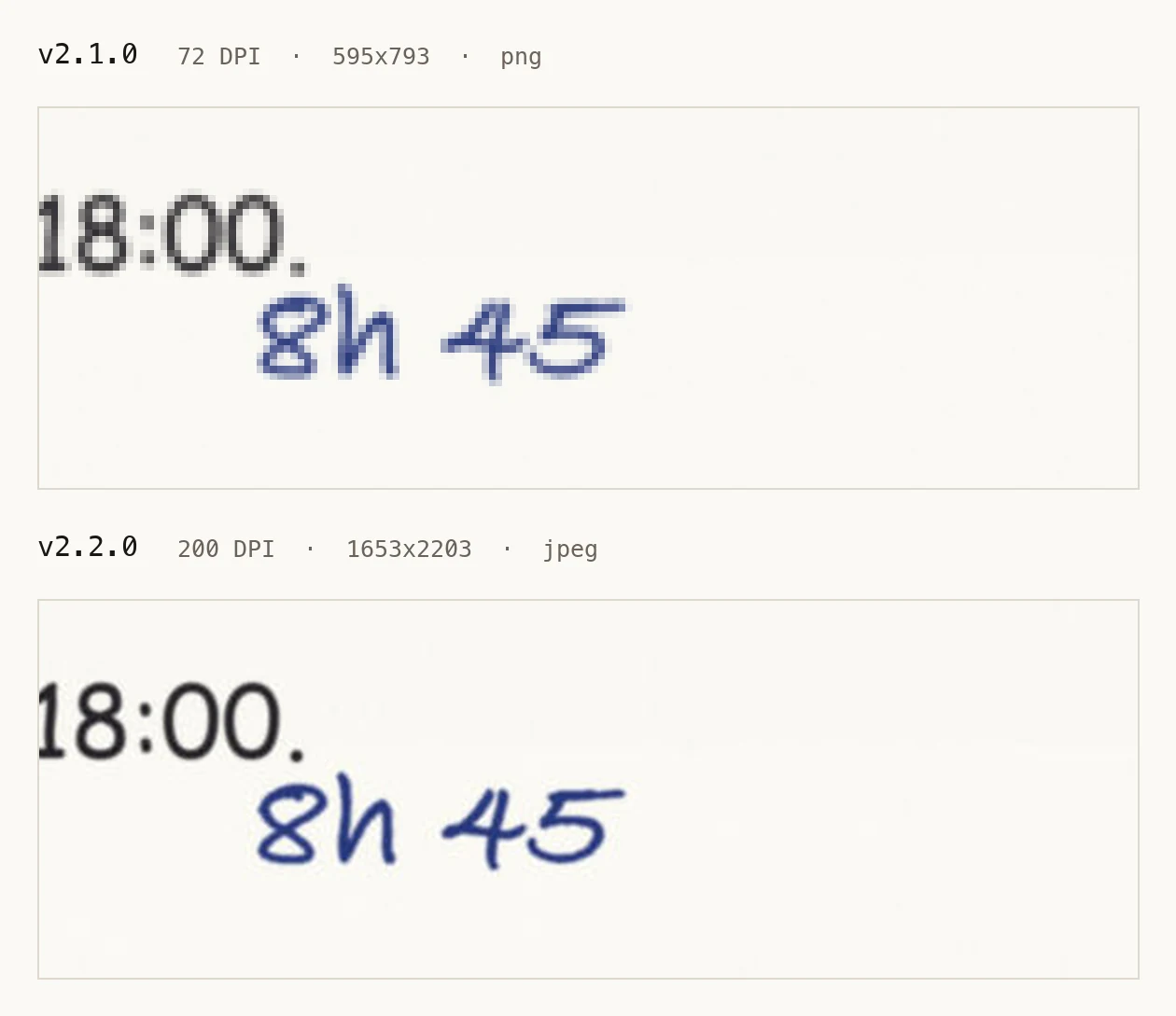
v2.1.0 floors pages 1 and 2 at 72 DPI on that call, then 76, 83 and 97 for the rest. v2.2.0 returns all five at the requested 200 DPI, as JPEG at quality 80, each flagged lossy: true with a path to the lossless PNG. The 72 DPI panel is upscaled without smoothing, so what you see is what the model had to read.
Did the agent come back?
I reran the same workflow against v2.2.0. I asked for pdf-mcp by name, so the interesting part is not that it used the tool. It is what it said after reading the first response:
Using pdf-mcp as asked.
Used pdf-mcp integration, ran a command
The tool's response corrects me: pdf-mcp does have a clip parameter, and clipped renders are never downsampled. I told you earlier it had no crop option. That was wrong, and it is exactly the capability I said was missing. Let me use it.
Used pdf-mcp integration, ran 3 commands, created a file
No prompt told it the crop option existed. The response body did: it called the render tool, read what came back, and retracted its own claim mid-session. The rest of the marking ran through pdf-mcp.
I now treat routing drift, an agent slowly preferring raw libraries over a served tool, as a monitoring signal, the same class of evidence as the PDF reading patterns that survived production.
A checklist for image-returning MCP tools
Everything above compresses to four checks. If your MCP server returns screenshots, page renders, charts, or any other raster:
- Know your byte budget and say when it bites. If you degrade an image to fit transport, report the degradation and its consequence, not just the number.
- Spend quality before resolution. For photographic content, lossy at full DPI beats lossless at low DPI for reading tasks. Keep the lossless original reachable.
- Surface every escape hatch in the response that needs it. A crop parameter documented in the README does not exist for an agent staring at a blurry render. Suggested next calls belong in the failure response itself.
- Read your agent’s routing behavior. Ask it why it uses what it uses. Mine wrote the diagnosis for me when I finally asked.
The phone scan was never the hard part. Vertical Japanese layouts break reading order and multi-column pages scramble it, but a phone scan is just a photograph of a page. My tool made it unreadable to stay under a byte limit, then reported a number instead of a problem.
The agent did nothing wrong. It read the responses I gave it and drew the right conclusions from insufficient evidence. If an agent stops using your tool, it is not being difficult. It is grading your API, and the grade is in the logs.