
Most MCP server tutorials end where the real work begins.
The first PR from an outside contributor came in February. Sebastian Elsner had hit a gap I’d deprioritized: clients could update Redmine custom fields but had no way to discover what fields existed. He didn’t file an issue. He sent a fix.
Three weeks later, Jelena Mihajlovic submitted OAuth2. Multi-tenant support was on my roadmap, tagged as “implement only if someone asks.” 33 new tests, full RFC compliance. She asked by submitting a complete implementation.
That’s when I understood the gap between a working MCP server and a production one.
I’ve been building and maintaining redmine-mcp-server since May 2025, starting with two read-only tools and shipping v1.1.0 with 21 tools, OAuth2, prompt injection guards, 689 tests, and 22,000+ PyPI downloads. The first post in this series covered the prototype. This one covers what happened after other people started using it.
TL;DR: The integration code was the easy part. Authentication, permissions, safety, and ecosystem changes consumed the other 80% of the work. In production, MCP servers need server-level guardrails, not prompt-level ones, and the ecosystem will move before you’re ready for it.
The named pattern here is the 80/20 Rule for MCP: the wiring is 20% of the work. The other 80% is everything production actually demands.
What it takes to run an MCP server in production
Building a production MCP server is about everything around the tools rather than the wiring itself: authentication for shared use, server-level safety controls that prompts can’t bypass, handling untrusted data from external systems, and supporting real workflows like time tracking and pagination. The integration layer is the easy part. The rest is what determines whether your server survives real usage.
From personal tool to production MCP server
The prototype had two tools: get_redmine_issue and list_redmine_projects. Both read-only, a single API key, built for one user with one Redmine instance.
It worked exactly as designed, for exactly that use case.
When contributors built what I’d deprioritized
I kept a backlog of features tagged “implement only if someone asks”: custom field discovery, multi-tenant support, time tracking. The assumption was that most users wouldn’t need them. I was wrong about the order of operations.
Sebastian Elsner was first. Clients could update issue custom fields but had no way to discover what fields exist, which values are valid, or which trackers a field applies to, leading to avoidable validation failures. He added list_project_issue_custom_fields so agents could discover field definitions before attempting writes, then strengthened create_redmine_issue and update_redmine_issue to handle custom field values safely.
Jelena Mihajlovic followed three weeks later with OAuth2. The problem it solved is structural: without per-user auth, everyone using the server shares one identity in Redmine. Same project visibility, same issue access, same audit trail. For a personal tool, that’s fine. For any shared deployment, it’s a non-starter. Her implementation followed RFC 8707 and RFC 8414: discovery endpoints, token validation middleware, token revocation. The server now advertises Redmine’s OAuth endpoints since Redmine doesn’t serve the discovery documents itself. The PR came with 33 new tests.
The pattern was the same in both cases: a feature I’d deprioritized turned out to be a blocker for someone in production, and the fix arrived as a PR rather than an issue.
Adding safety before adding users: read-only mode and prompt injection
With write access and multiple users, two problems surfaced that couldn’t be solved at the prompt level.
Read-only mode. The new REDMINE_MCP_READ_ONLY=true environment variable blocks all write tools at the server, not the prompt. This matters because prompt-level restrictions are bypassable. A note buried in a Redmine issue description cannot disable an environment variable. Most enterprise deployments want read access first, prove value, then expand deliberately. One env var, and an agent cannot create or modify issues at all. The same switch does double duty when you deploy a server you cannot modify at all: pair it with an auth gate at the reverse proxy to expose someone else’s MCP server safely. For that deployment shape, see how to deploy a Python MCP server behind a reverse proxy.
A CVE in mcp-database-server (where read-only mode could be bypassed through prompt injection) validated why this decision needs to live at the server level, not the system prompt. For the runtime patterns that complement server-level guardrails, see AI Agent Error Handling Patterns.
Prompt injection boundaries. Any content that comes from Redmine and lands in the LLM context is user-controlled: issue descriptions, journal entries, wiki pages, version notes. An attacker with write access to Redmine could embed instructions that override the agent’s behavior.
The fix: wrap every piece of user-controlled content in boundary tags with a random 16-character hex identifier before it reaches the model. The boundary signals to the LLM that the content is from an untrusted external source. I covered the full threat model in MCP Server Security: Lessons from Auditing My Own Server. The Redmine-specific decision was simple: apply the boundary to every piece of user-controlled text, without exception.
What enterprise Redmine deployments actually need
The feature requests that followed OAuth2 were unglamorous. Time tracking CRUD. Project member and role listings. Journal pagination for issues with hundreds of comments. Include flags for watchers, relations, and child issues. SSL/TLS for self-signed certificates.
None of these make good tutorial demos, and all of them are the difference between a server that works in a demo and one that works in a production environment.
Time tracking is the clearest example. Most MCP tutorials for project management tools skip time logging entirely. In Redmine, time entries connect to billing, capacity planning, and project reporting. Without them, an agent can read issue status but cannot tell you how much time was logged against the work. The list_time_entries, create_time_entry, and update_time_entry tools also came from Jelena Mihajlovic.
Journal pagination is another. In production Redmine instances, some issues accumulate hundreds of journal entries over months. Returning all of them in a single tool call bloats the context window and degrades response quality. The journal_limit and journal_offset parameters let agents page through history without loading it all at once.
Then the ecosystem moved
Four weeks after v1.0.0, the tooling changed.
FastMCP released v3.0.0 as a standalone package, separate from the mcp[cli] package the server was built on. The migration required code changes, not just a version bump: tool function signatures, transport configuration, and constructor parameters all changed.
The migration took a few hours. What it reinforced: in 2026, the MCP tooling is still stabilizing. A server correctly built against mcp[cli] last quarter may need code changes next quarter. Build tests that catch breaking changes before your users do, because otherwise your users will. For a framework on testing agent systems at each layer, see How to Test AI Agents Before They Break Production. If you’re building a server for the first time, How to Build an MCP Server in Python gives you the foundation before the ecosystem started shifting.
The 80/20 rule for MCP servers
The first post in this series ended with: the integration code is 20% of the work.
Ten months and 20+ releases confirm it.
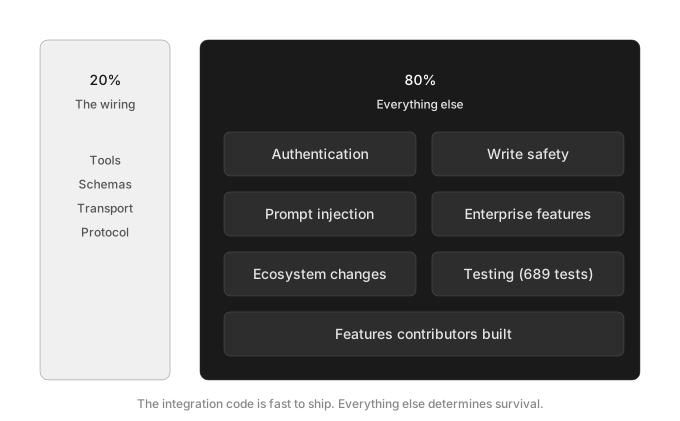
The MCP wiring, meaning tools, schemas, and transport, is the part that’s fast to ship and easy to demo. Authentication for shared deployments, write-operation safety, prompt injection guardrails, enterprise feature depth, and ecosystem migrations are the other 80%. They’re also what determines whether a server is useful in production or only in a notebook. For the same “what changes after you ship” lens applied to pdf-mcp, see How Claude Code Actually Reads PDFs, where the surprise was the agent’s tool-usage pattern rather than the integration layer.
The GitHub repo has Docker deployment instructions, OAuth2 setup docs, and the full tool reference.