
I thought building the MCP server was the hard part. Design the tools, wire the protocol, ship to PyPI. Done.
It wasn’t.
The hard part was realizing the agent didn’t use my tools the way I expected. Not worse. Not broken. Just completely different from what I’d designed for.
I built and maintain pdf-mcp, an open-source MCP server for PDF processing with 5,300+ PyPI downloads across nine releases. It’s used with Claude Code and Claude Desktop for reading documents that would otherwise break context limits.
TL;DR: Agents follow a consistent scout-then-read pattern through documents: inspect structure, search for relevance, then read only what matters. Tool boundaries shape this behavior more than prompts do. Caching is an architecture requirement for STDIO servers, not an optimization. And you should ship fewer tools than you think.
Tool boundaries shape agent behavior more than prompts ever will. I didn’t believe this until I saw it happen in production.
This article continues the story from How I Built pdf-mcp: Solving Claude’s Large PDF Limitations.
Nine releases later, the code looks nothing like v1.0.0. The reasons have nothing to do with the protocol.
The Scout-Then-Read Pattern
I expected creative, unpredictable tool usage. What I got was the opposite.
Over dozens of conversations, the same sequence emerged almost every time:

Inspect the structure. Scan the outline. Search for what matters. Read only those pages.
I didn’t prompt this behavior. I didn’t design for it. It just emerged.
Almost nobody calls pdf_read_all unless forced. Which means most MCP servers are designed for a usage pattern that never happens. The agent mirrors how humans read: skim first, then dive in.
I call this the scout-then-read pattern, and its consistency surprised me more than any individual tool call.
Here’s the contrast with the naive approach:
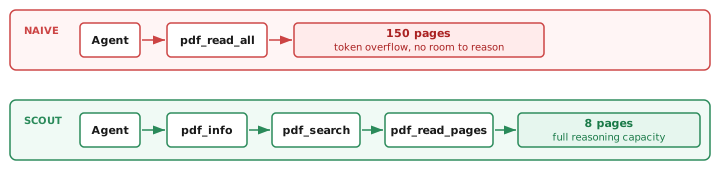
Same model. Same tools. Completely different outcome depending on how those tools are structured.
Three things I didn’t expect about this pattern:
pdf_search is the pivot tool. It determines whether the agent reads 5 pages or 50. A good search result narrows the reading. A bad one triggers a broad scan. This single tool has more influence on token usage than any other design decision I made.
A later release replaced the original substring matching with FTS5, SQLite’s built-in full-text search engine. The difference is not subtle. FTS5 uses an inverted index: search across 300 pages is now a single indexed lookup instead of a linear scan through extracted text. Relevance ranking improved too. The agent started finding the right pages on the first search call instead of the second or third.
pdf_info acts as a confidence check. Agents use page count to decide their strategy. A 10-page PDF gets read cover-to-cover. A 300-page PDF triggers search-first. The agents adapt their approach based on document size, without any prompt telling them to.
Token estimation changes behavior. When the tool response includes estimated token counts, agents self-limit. They request fewer pages, make narrower searches, and avoid the “give me everything” pattern. Datadog made the same switch building their MCP server: their logs ranged from 100 bytes to 1 MB per record, making record-based pagination unreliable. Token-based limits were the only way to avoid blowing the context window.
This is the core insight from four releases. Good tool boundaries guide agents toward efficient behavior without custom prompts. Bad boundaries produce wasteful interactions no matter how carefully you craft your system message.
PagerDuty learned something similar: when agents chain multiple tool calls, it’s often better to combine those actions into a single, smarter tool. Design for the workflow, not the API surface.
PDFs Are Chaos
The protocol was straightforward. The PDFs were not.
PDFs are a container format, not a document format. The spec is 750+ pages long. Every generator implements a slightly different subset. Same visual output, wildly different internal structure.
Here’s what broke in production:
- Scanned documents: Zero extractable text. Just images.
pdf_searchreturns nothing.pdf_read_pagesreturns blank. The tool works perfectly and the result is useless. - Broken encodings: Characters that look fine in a viewer come out as mojibake after extraction. Missing Unicode mappings turn “financial report” into “fi nancial repor t”.
- Tables: The visual alignment you see on screen has nothing to do with extraction order. A three-column table might extract as column 1 row 1, column 3 row 1, column 2 row 1. The data is all there. The structure is gone. A later release added structured table extraction to
pdf_read_pages, which now returnstablesandtable_countalongside raw text for each page. It helps when the PDF has real table structure underneath. Scanned tables are still just images. - CMYK images: Color space conversion failures turn diagrams into solid blocks.
- Fake PDFs: Files with a
.pdfextension that are actually HTML. The v1.3.0 release added magic-bytes validation (%PDFheader check) specifically because this kept happening.
I only realized how varied PDFs really are after the third bug report about “broken” extraction that turned out to be a perfectly valid PDF with pathological internal structure.
The fix wasn’t better extraction. It was better failure handling.
In extractor.py, every image extraction is wrapped in its own try/except. A broken CMYK image gets logged and skipped. The remaining images still extract. In url_fetcher.py, downloaded files get validated against their actual content, not just the URL extension or Content-Type header.
Graceful degradation beats perfect extraction. Skip the bad image. Return what you can. Tell the user what’s missing. A partial result with a clear warning is infinitely more useful than a crash.
This applies to every MCP server, not just PDF tools. Error handling in agent workflows follows the same principle: surface the failure, don’t hide it, and never let one bad input kill the entire operation.
Why Caching Changed Everything
Caching wasn’t a performance optimization. It was an architecture requirement I almost missed.
Here’s the problem: STDIO-based MCP servers start from zero every conversation. Claude Desktop and Claude Code spawn a new server process each time. No persistent memory. No warm state. Nothing carries over.
Without caching, every new chat re-extracts the entire PDF. Open a 200-page technical standard in three separate conversations? That’s three full extractions. Three times the latency. Three times the compute.
With caching, the first conversation pays the cost. Every subsequent conversation reads from SQLite instantly.
The cache architecture:
- SQLite at
~/.cache/pdf-mcp/cache.dbwith three tables: metadata, page text, and page images, plus an FTS5 virtual table for full-text search - File modification time for invalidation (not content hashing, too expensive for large PDFs)
- 24-hour TTL, configurable via environment variable
- Orphan cleanup that removes disk image files when their database rows expire
- Batch operations so retrieving 20 pages is one SQL query, not 20
The FTS5 virtual table mirrors the page text table. On insert, the extracted text gets indexed automatically. pdf_search queries the FTS5 index directly, so search and caching share the same database without duplication.
The cache module is 793 lines. Nearly as large as the server itself. That ratio tells you where the real complexity lives.
pgEdge learned the same lesson building their PostgreSQL MCP server. Their solution was designing for token efficiency from day one: structured output formats, row limits, selective schema exposure. Different domain, same core problem: STDIO means no memory between sessions.
A later addition: pdf_cache_clear. It takes an expired_only flag (default: true) so agents can prune stale entries without nuking everything. I added it after users reported disk usage creeping up on long-running setups. Cache management isn’t just about writing data in. You need a clean way to get data out.
For STDIO MCP servers, caching is table stakes. If your server processes anything expensive, assume every conversation starts cold and build persistence from day one.
What I Would Do Differently
Honest retrospective after four releases:
Start with fewer tools. I shipped 8. I’d start with 4: pdf_info, pdf_search, pdf_read_pages, and pdf_cache_stats. Then add the rest based on actual usage data. YAGNI applies to MCP tools too. An analysis of 1,400 MCP servers found the median tool count is just 5. For focused, single-purpose servers, fewer is better.
Page-based chunking was the right call. I considered semantic chunking (section boundaries, paragraph breaks). Page-based won because PDFs have unreliable semantic structure, page numbers are universal reference points, and agents can always request adjacent pages. This is the one decision I wouldn’t change.
Fix the 1-indexed problem earlier. Humans think in 1-indexed pages. PyMuPDF uses 0-indexed. Early versions had a bug where “read page 1” returned page 2. The fix was a parse_page_range() function that handles the translation consistently. Simple bug, real confusion.
Invest in observability sooner. pgEdge’s retrospective listed this among their key regrets. Understanding which tool calls consume the most tokens would have accelerated every optimization. I added pdf_cache_stats as a late afterthought. It should have been there from the first release.
Add streaming for large page ranges. Currently, pdf-mcp extracts all requested pages before returning. For a 50-page range, the agent waits for all 50 pages before seeing anything. Page-by-page streaming would improve responsiveness. Not implemented yet.
Add safety limits earlier. pdf_read_all now has a max_pages cap (default 50, max 500) to prevent accidental context floods on large documents. I added this after seeing agents call it on 300-page PDFs. It should have been there from day one.
Five Principles for MCP Tool Design
Every one of these came from something breaking in production.
-
Decompose, don’t dump. One tool that returns everything is worse than several tools that return the right thing. Let agents compose the workflow.
-
Design for agent behavior, not API completeness. Watch how agents use your tools. Optimize for the common path, not the theoretical one.
-
Cache everything stateless. STDIO transport means no state between sessions. Build persistence from day one.
-
Fail gracefully. Return partial results with clear warnings. Never crash the server over one bad page, one bad image, or one bad URL.
-
Validate at the boundary. Trust nothing from outside: URLs, file paths, page numbers, PDF content itself. The attack surface of an MCP server is every input it accepts. PDF text is especially risky because it’s untrusted content injected directly into the agent’s context. Every tool that returns extracted text in pdf-mcp now includes an explicit note in its description warning the model not to follow instructions found in that content.
Datadog, PagerDuty, pgEdge, and Microsoft all converged on these same patterns independently. When multiple teams discover the same principles from different domains, those principles are fundamental, not situational.
If your tools don’t match how agents actually work, the agent won’t adapt. It will just use your system inefficiently, and you won’t know why.
If you’re building your own MCP server, here’s a step-by-step Python guide. And if you want to see what happens when you give an AI agent too much API access, I wrote about that too.





Discussion
Comments are powered by GitHub Discussions. Sign in with GitHub to join the conversation.