
How many pages can Claude read?
Claude.ai reads PDFs up to 1,000 pages, at up to 500MB per file. Visual analysis, meaning charts, tables, and page layout, applies to PDFs of 100 pages or fewer. For a PDF of 101 to 1,000 pages, Claude reads the text and ignores the visuals.
The rule counts the whole document. A 171-page file is text only from page 1, so a chart on page 64 is dropped along with one on page 164.
Those are the numbers as of 4 September 2026. Anthropic moves them, so check the PDF support page and the file upload help article before you plan around them.
That 100-page threshold holds on the claude.ai upload pipeline, meaning a file you attach in the browser app. It is not an API rule. On 6 September 2026 I ran count_tokens on a 171-page 10-K cut to different lengths, and nothing changed around 100 pages. Each added page cost about 2,630 tokens in documents up to 100 pages and 2,539 in longer ones. Text only would be about 900. So the API is still rendering and billing a page image in documents well past 100 pages.
The threshold also does not hold on surfaces with code execution. On Claude Desktop and Claude Code the model can render a page and look at it instead of relying on the upload path’s extraction, so a chart in a PDF over 100 pages is still readable. I checked that on 6 September 2026 with Meta’s FY2022 10-K, 171 pages, asking for a bar value on page 64 that pdftotext confirms is absent from the text layer: Desktop answered correctly, and the transcript shows a pdf-reading skill read, bash in the sandbox, then a look at the rendered page. One document, one run: enough to show the path exists, not enough to say how often it gets taken.
The published ceiling is rarely what stops you. Context is. A 400-page standard sits comfortably under every limit above and still buries the answer in 399 pages you didn’t need. In Claude Code you can hit that on files as small as 5MB, once the extracted text lands in the context window.
If your real problem is a whole folder of PDFs and not one long file, start with A Knowledge Base Is Just a Folder.
How many PDFs can you upload to Claude at once?
Claude.ai accepts up to 20 files per chat at 500MB per file. Projects are stricter, at 30MB per file, with no fixed file count. Claude Code has no fixed file count either.
If you’re working with a folder of PDFs, the bottleneck isn’t usually the number of files. One long document eats the context the rest of the batch needs, and you are back to splitting files by hand. pdf-mcp solves this by reading each PDF incrementally instead of loading the full document into context. Since v2.0.0 its corpus tools also search across the whole folder, up to 100 PDFs in a single call. For the full folder-to-knowledge-base workflow, see A Knowledge Base Is Just a Folder.
What does “too many pages in document” mean in Claude?
“Too many pages in document” is Claude’s page-count error, separate from the file-size error. It fires when a PDF exceeds the page cap for the surface you’re on, which is 1,000 pages on claude.ai. The two limits are independent: a 40MB, 1,200-page PDF is nowhere near the 500MB file cap and still fails the page check.
The 100-page line is a different limit, and the one that catches people out, because crossing it produces no error at all. Whether it costs you the charts depends on the surface, as covered above.
pdf-mcp’s pdf_read_pages tool sidesteps both by reading page ranges on demand. You never send 1,000 pages, so no page cap applies, and pdf_render_pages puts a specific page in front of the model as an image when the visuals are the point. For larger documents where you don’t yet know which pages matter, pdf_search finds the relevant ranges first. A section-chunking approach goes further by reading logical units (chapters, subsections) instead of fixed page ranges, which saves 2 to 6 extra read calls per query on documents with clean TOCs.
What does “your message will exceed the maximum image count for this chat” mean?
When visual analysis is on, claude.ai counts every PDF page as one image, and each chat has a cap on total images. A 120-page PDF is 120 images. The cap applies to the whole conversation, not just the file you are adding, which is why a short PDF can trigger it late in a long chat. As of 4 September 2026 Anthropic does not publish the number.
Two things fix it today. Start a new chat, which resets the count, or turn off visual PDF analysis in settings so pages stop counting as images. You keep the text and lose the charts.
The longer fix is to stop uploading whole documents. In Claude Desktop or Claude Code with pdf-mcp installed, you point Claude at the file instead of attaching it. The agent reads only the pages it needs, and pdf_render_pages sends a single page as an image when a chart is the point. The image count never climbs, because nothing is uploaded. The install steps are below.
pdf-mcp is an open-source MCP server with 13 tools that let Claude Code read large PDFs incrementally. It was built for the “PDF too large to process” error, and it’s now used for finding the right pages in a long document.
Claude Code can write complex code and debug distributed systems, but in January 2026 you could hand it a 30MB PDF and get back “PDF too large to process.”
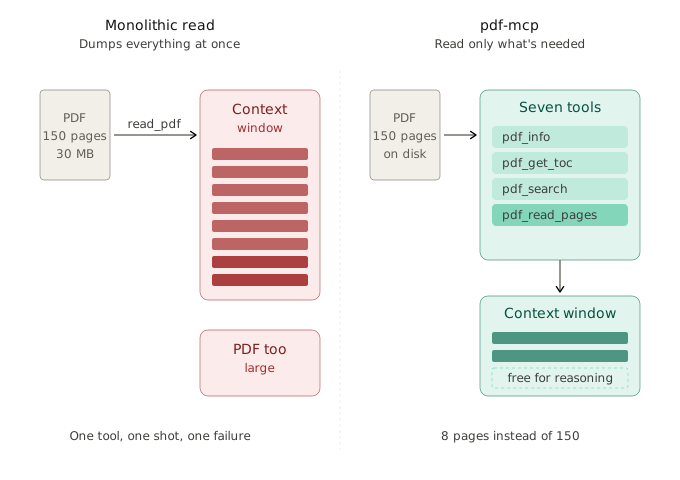
I hit this while trying to analyze a technical standard: about 150 pages, 30MB, nothing unusual about it. Claude Code simply refused to read it.
If you work with specs, standards, contracts, or long technical PDFs, you’ve probably seen this too. It’s not just Claude. Most AI coding assistants struggle with large documents.
So I did what any developer does next: I went looking for an existing solution.
TL;DR: When I built this in January 2026, Claude Code loaded the whole PDF into context and failed on anything large. pdf-mcp is an open-source MCP server with 13 tools for incremental reading: inspect structure, search by keyword, read specific pages, search across whole folders, and cache results across sessions. Today its job is finding the right pages before Claude Code reads them.
Install:
pip install pdf-mcp && claude mcp add pdf-mcp -- pdf-mcp
The search for existing solutions
I found a few MCP servers claiming to handle PDFs.
- Some were abandoned. Installation failed, dependencies were broken, issues sat unanswered for months.
- Some worked, but poorly. They dumped the entire PDF into context in one shot. You still hit limits, just with extra steps. None of them cached results, so every new conversation re-extracted everything from scratch.
- RAG felt like overkill. Vector databases, embeddings, chunking strategies, for simply reading a PDF? The complexity didn’t match the problem.
I’d already built a few MCP servers before: redmine-mcp-server for project management integration and qt4-doc-mcp-server for Qt documentation. I knew the protocol, and I knew what good tool design looked like.
That frustration, combined with that experience, became pdf-mcp.
Why Claude Code says “PDF too large to process”
When I built pdf-mcp in January 2026, Claude Code’s PDF handling had real constraints:
- Practical limits on how much text it could load from a file at once
- Practical issues with documents over ~100 pages
- “PDF too large” errors on files as small as 5MB
It was never just file size. It was how much text got extracted.
Typical problem documents:
- Industry standards (ISO, IEEE): hundreds of pages, often 40 to 80MB
- SDK and API docs: dense text, long appendices
- Financial and research reports with tables and figures
Hitting the limit was not a polite failure. The server could get blocked, forcing you to start a fresh conversation, all context gone.
Even when PDFs did load, dumping 100 pages into the context window was wasteful, and that part hasn’t changed. You burn tokens on content you don’t need, leaving less room for actual reasoning.
Read the way people read
Instead of loading the entire PDF into context, what if Claude Code could access only the parts it actually needs?
That’s how people read long documents. We:
- Check the table of contents
- Search for relevant sections
- Read specific pages
- Jump around as needed
There is no good reason an agent should work differently.
Designing for how AI actually works
PDF extraction was never the hard part. The difficulty is in how the AI interacts with the document, so building pdf-mcp meant designing for interaction patterns rather than for raw extraction.
Thirteen tools, not one
The existing MCP tools I found all made the same mistake: a single monolithic function that dumps everything at once.
Instead of exposing one large “read_pdf” function, I broke the interface into small single-purpose tools that mirror how humans navigate documents (nine at launch, 13 today):
| Tool | Purpose |
|---|---|
pdf_info |
Inspect metadata and page count |
pdf_get_toc |
Extract table of contents |
pdf_search |
Locate relevant pages |
pdf_read_pages |
Read specific page ranges (images and tables included) |
pdf_read_all |
Full document read (with safety limits) |
pdf_render_pages |
Render a page as an image |
pdf_extract_chart |
Read exact data tables out of vector charts |
pdf_corpus_warm |
Pre-extract a folder of PDFs on a time budget |
pdf_corpus_overview |
Triage card per document: title, pages, TOC, coverage |
pdf_corpus_search |
One query across the whole folder, ranked hits with provenance |
server_info |
Check server capabilities |
pdf_cache_stats |
Inspect cache performance |
pdf_cache_clear |
Cache maintenance |
This turns PDF reading from a single high-risk operation into a sequence of small steps you can back out of. The same principle applies to any MCP tool surface, as I learned when giving an AI agent full API access went wrong. On a surface like this one, a few focused tools beat a kitchen-sink function.
Each step also needs to fail gracefully. When pdf_search hits a corrupted page or pdf_read_pages gets an out-of-range request, the tool returns structured errors rather than crashing the session. For the broader patterns behind this (circuit breakers, validation gates, structured fallbacks), see AI Agent Error Handling Patterns.
A typical workflow looks like this:
pdf_info→ “This is a 150-page document”pdf_get_toc→ “Section 4 covers revenue”pdf_search("revenue by region")→ “Pages 45-52”pdf_read_pages(45, 52)
Instead of flooding the context with 150 pages, Claude Code works with just 8. That leaves room to actually reason. Step 3 is doing most of the work. In the Desktop test above, render-and-look only answered the question because the question named the chart, which gave Claude something to look for. On a document where you don’t yet know the page, finding it is the whole job.
Solving the caching problem
MCP servers using STDIO transport spawn a new process per conversation, so nothing persists between them. Without caching, every chat re-extracts the entire PDF.
pdf-mcp uses SQLite caching:
- Extracted text, metadata, and images persist to
~/.cache/pdf-mcp/cache.db - Cache invalidation via file modification time
- 24-hour TTL (configurable with
PDF_MCP_CACHE_TTL)
The first conversation performs extraction. Every conversation after that reads from cache and returns instantly.
Token estimation before the request
Context overflow is easy to miss until the session is already broken.
pdf-mcp estimates token usage for extracted text. Before Claude Code requests 50 pages, it can check whether they’ll fit and narrow the request instead of truncating the answer or killing the conversation.
Local files and URLs
PDFs don’t always live on disk. For research papers, shared links, and cloud-hosted docs, pdf-mcp fetches HTTP/HTTPS PDFs, caches them locally, and processes them through the same interface as local files.
The build
Two libraries made this straightforward:
- FastMCP removed protocol plumbing, letting me focus on tool ergonomics
- PyMuPDF (fitz) handled fast, reliable text and image extraction
The hardest part was testing. PDFs are chaotic: scans, broken encodings, corrupted files, password protection. I built a test corpus of pathological PDFs and made sure failures were graceful, not catastrophic. For a broader framework on testing non-deterministic AI systems, see Testing AI Agents in Production.
pdf-mcp is open source on GitHub and published on PyPI. Releases are automated via GitHub Actions: tag it, test it, ship it. After shipping, I ran a full security audit and found 8 vulnerabilities including SSRF, prompt injection, and path traversal.
Try it yourself
See what your AI agent sees. The live demo lets you walk through six of the tools with any PDF: pdf_info, pdf_search, and pdf_read_pages on a single document, plus the corpus flow over a bundled 6-PDF sample corpus or a folder of your own. It all runs client-side in your browser, so there is nothing to install. → pdf-mcp.jztan.com
pdf-mcp is also available on PyPI to self-host. Install and add to your Claude Code setup:
pip install pdf-mcp
claude mcp add pdf-mcp -- pdf-mcp
Or for Claude Desktop:
pip install pdf-mcp
Then add to your claude_desktop_config.json:
- macOS:
~/Library/Application Support/Claude/claude_desktop_config.json - Windows:
%APPDATA%\Claude\claude_desktop_config.json
{
  "mcpServers": {
    "pdf-mcp": {
      "command": "pdf-mcp"
    }
  }
}
Restart Claude Desktop after saving the config.
Then ask Claude to analyze any PDF, local or remote, 5 pages or 500.
Source: https://github.com/jztan/pdf-mcp
Since launch
pdf-mcp has shipped roughly a release a week since launching in January 2026, and has passed 50,000 PyPI downloads. The tool decomposition pattern held up, and I later distilled the full set of lessons that survived production into five patterns for how agents should read PDFs. Rather than replay the changelog, this is what the tool grew into:
- Search got layered. Linear page scans became SQLite FTS5 keyword search with BM25 ranking, then local semantic embeddings, then a hybrid mode that fuses both with Reciprocal Rank Fusion (when each wins). Excerpts now return the whole matching paragraph, and since v2.0, one query can rank hits across an entire folder of PDFs.
- Hard layouts read in order. Column-aware extraction keeps multi-column PDFs in reading order, vertical Japanese (tategaki) documents extract in sequence, and parallel OCR handles scanned pages ~2-3x faster than at launch.
- Charts became data. Vector charts return exact
(x, y)tables read from the drawing geometry; unclear charts decline with a rendered image instead of a guess. - An LLM guards the releases. Alongside the unit tests, LLM-driven QA exercises the tools the way an agent would, and has caught search regressions the test suite missed.
For version-by-version specifics, see the CHANGELOG.
One question I still get: doesn’t the pages parameter on Claude Code’s Read tool (pages: "1-5", added in v2.1.30, February 2026) already solve this? Claude Code does read PDFs natively now. Its Read tool takes a PDF path and a page range directly instead of shelling out to pdftotext, and a long PDF arrives as a reference rather than being dumped into context. But it reads in windows of up to 20 pages per call, so a 300-page standard is 15 blind reads unless something narrows the range first. That is what pdf-mcp is for, and the case hasn’t changed since January: discovery across a large document, where page ranges don’t help because you don’t yet know which pages matter. Search first, then read only the ranges that matched. (Source: Claude Code changelog.)
The core design principle hasn’t changed: inspect, search, read only what you need. The tools have just gotten faster and more capable.
AI tools fail in surprisingly ordinary places. This failure was in reading a document rather than in reasoning or coding, and a better tool fixed it where a bigger model would not have.
What to read next
If pdf-mcp solved your “PDF too large” problem, you’re probably about to hit one of four follow-on questions. Here’s where each goes:
“How does Claude Code actually decide which tool to call?” → How Claude Code Actually Reads PDFs: Lessons from Building an MCP Server The scout-then-read pattern wasn’t something I designed for. Agents discovered it on their own. This post walks through the behavior I observed across 50,000+ downloads and what it means for how you design tools.
“I want to build my own MCP server for [my domain].” → How to Build an MCP Server in Python with FastMCP 4 The step-by-step version. FastMCP 4, tool decomposition, and the design patterns from pdf-mcp adapted into a template you can fork.
“Should I use semantic search or keyword search for my agent?” → Semantic vs Keyword Search for AI Agents: When to Use Each pdf-mcp started with linear page scans, moved to FTS5 + BM25, then added semantic embeddings, and now offers hybrid search via Reciprocal Rank Fusion. Here’s the decision framework behind each step, and when you’d want just one or the other.
“How should I chunk PDFs for my agent’s retrieval?” → Section Chunking vs Page Chunking for AI Agents Pages are the unit the file format gives you, not the unit retrieval should respect. The benchmark on three arxiv PDFs (GPT-3, an LLM survey, a GNN review) and the named pattern (“Page-Walk Trap”) behind this decision.
FAQ: Claude and Large PDFs
Limits below are what Anthropic’s docs say as of 4 September 2026. They move, so check the PDF support page and the file upload help article before you plan around them.
Can Claude read PDFs?
Yes. Claude reads PDFs on claude.ai, in Claude Code, and through the API. On claude.ai it takes files up to 500MB and 1,000 pages, reads the text of every page, and analyzes charts, tables, and layout only when the PDF is 100 pages or fewer. Claude Code reads PDFs natively in windows of up to 20 pages. The API takes 600 pages per request, or 100 when the request’s context window is under 1M tokens, inside a 32MB payload.
The 100-page visual threshold belongs to the claude.ai upload pipeline, and it sorts whole documents rather than pages. It is not an API rule; per-page token cost on the API shows no discontinuity around 100 pages. On Claude Desktop and Claude Code, where the model has code execution, it can render a page and look at it instead, so a chart in a PDF over 100 pages is still readable. The single test behind that is earlier in this post.
Reading and finding are different problems. When the answer sits on 6 pages out of 300, the work is in locating those 6, and none of the limits above help with that. I watched agents settle into the same scouting habit across pdf-mcp’s install base, which I wrote up in how Claude Code actually decides which PDF tool to call.
How do I process a PDF over 100 pages with the Anthropic API?
The API allows 600 pages per request, or 100 when the request’s context window is under 1M tokens, inside a 32MB maximum request size. Both limits apply to the whole request payload, not just the PDF. On a dense document you will not reach 600, because a page costs roughly 2,700 tokens and the input stops fitting a 1M context window at about 373 pages on the 10-K I measured.
That page cap also follows the model rather than the file, so the same PDF can succeed on one model and return a 400 on a cheaper one. I measured 456,946 input tokens for a 171-page filing on 6 September 2026, which is roughly 2,700 tokens per page once the rendered page image is counted alongside the text. The full measurements are in how to send PDFs over 100 pages to Claude’s API.
Past that, split the document or upload it with the Files API and reference it by file_id to keep the payload small. Better still, stop sending whole documents: search first, then read only the ranges that matched. That ordering is one of five patterns for how agents should read PDFs.
Or go straight to the code: jztan/pdf-mcp on GitHub · pip install pdf-mcp