
Managed newsletter platforms start free. Then you hit 500 subscribers and pay $13/month. Hit 2,500 and you are at $45/month, for a list you do not fully own.
I built the same thing on AWS. It costs about $0.08/month at 200 subscribers, essentially just the emails it sends. Seven Lambda functions, two SQS queues, one DynamoDB table. SES for sending. No per-subscriber fee. No platform owning your audience.
This is the actual stack running on this blog. It handles subscribe confirmations, broadcasts new posts automatically when the Atom feed updates, and suppresses bounced addresses before they damage sender reputation. SES sits behind SQS workers, so the user-facing redirect returns in tens of milliseconds whether SES is healthy or not. The whole thing deploys in under 30 minutes with AWS SAM.
TL;DR: Seven Lambda functions (subscribe, confirm, broadcast, unsubscribe, ses-events, plus two SQS workers that do the actual SES sends) behind an API Gateway HTTP API. Two SQS queues each backed by a 14-day dead-letter queue isolate SES from the user redirect. DynamoDB stores subscribers with TTL-based cleanup for unconfirmed signups. Two SSM parameters: broadcast secret and last-sent slug for deduplication. Total cost: ~$0.08/month at 200 subscribers (just the SES sends); free tier covers the rest.
The platform fee you pay for Mailchimp is for subscriber list management, not for email delivery, and you can build that yourself in an afternoon.
Why not Substack or Mailchimp
Substack is free to start. That is true. But Substack owns the brand surface. Readers follow your publication on Substack, not on your domain. If you leave, the recommendation algorithm does not come with you.
Mailchimp is different: you keep the list, but the cost scales with subscriber count. At 500 contacts on a paid plan, it is $13/month. At 5,000, it is $75/month. You are paying for a UI, list management, and deliverability tooling. All three are solvable on AWS.
Mailchimp’s Essentials plan at 5,000 contacts costs $75/month. The same volume on SES costs $2.00 (four monthly broadcasts). Managed platforms charge per subscriber, not per send. AWS flips this.
The architecture
Seven Lambda functions split into a user-facing layer that returns fast and a background layer that does the SES sends:
| Function | Trigger | What it does |
|---|---|---|
| subscribe | POST /subscribe | Validates email, creates pending record, enqueues confirm-email message |
| subscribe_worker | SubscribeEmailQueue | Renders confirm template, calls SES |
| confirm | GET /confirm | Validates token, marks subscriber confirmed, enqueues welcome-email message |
| welcome_worker | WelcomeEmailQueue | Renders welcome template, calls SES |
| broadcast | POST /broadcast | Fetches Atom feed, sends to confirmed subscribers |
| unsubscribe | GET /unsubscribe | Marks subscriber unsubscribed by token |
| ses_events | SNS | Handles bounce and complaint events from SES |
One DynamoDB table. One API Gateway HTTP API with a 5 req/sec route
throttle on POST /subscribe. Two SQS queues each backed by a 14-day
dead-letter queue. Two SSM parameters: one for the broadcast secret,
one for deduplication state. Two SNS topics: SesEventsTopic for
bounce and complaint events, OpsAlertsTopic as a single fan-in for
stack alarms. Four CloudWatch alarms: broadcast errors, subscribe
errors, and one DLQ-depth alarm per worker.
The entire stack lives in a single SAM template.yaml. Two flows
do the work: subscriber lifecycle (signup, confirm, unsubscribe) and
broadcast (new-post fan-out). The diagrams below show each.
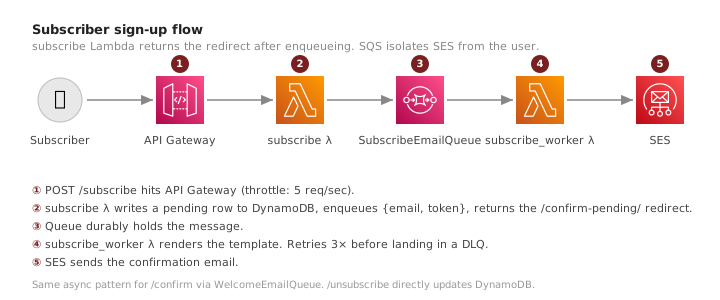
The subscribe and confirm flow
Subscribe takes a POST with an email address, creates a record in
DynamoDB with status: pending, and enqueues a message for the
worker to send the confirmation email:
table.put_item(Item={
    'email': email,
    'status': 'pending',
    'confirm_token': str(uuid.uuid4()),
    'unsubscribe_token': str(uuid.uuid4()),
    'ttl': int(time.time()) + 48 * 3600,  # 48h
})

sqs.send_message(
    QueueUrl=SUBSCRIBE_EMAIL_QUEUE_URL,
    MessageBody=json.dumps({
        'email': email,
        'confirm_token': confirm_token,
    }),
)
The handler then returns a /confirm-pending/ redirect. SES never
sits on the user’s request path. SubscribeEmailWorkerFunction
consumes the queue with BatchSize: 1, loads confirm-email.html,
and calls SES. If SES throws, the message returns to the queue and
retries; after three failures it lands in SubscribeEmailDLQ, which
has a CloudWatch alarm on depth ≥ 1.
The ttl field is important. Unconfirmed subscribers expire
automatically after 48 hours. DynamoDB’s TTL feature handles the
deletion: no cron job, no manual sweep, no extra cost. Combined with
the 5 req/sec route throttle on POST /subscribe, abuse traffic
self-cleans within two days.
Confirm reads the token from the query string and looks it up via a GSI:
resp = table.query(
    IndexName='confirm-token-index',
    KeyConditionExpression=Key(
        'confirm_token'
    ).eq(token),
)
GSI on confirm_token means the lookup is a direct key query, not a
table scan. Fast at any list size.
Confirm uses the same SQS pattern: it updates the row to
status: confirmed, enqueues a message to WelcomeEmailQueue, and
returns the /confirmed/ redirect. WelcomeEmailWorkerFunction
picks up the message and sends the welcome email via SES.
Why SQS sits in front of SES
The first version called SES directly from the subscribe handler.
The user redirect waited for sesv2.send_email to return. With a
cold Lambda at 128 MB, boto3 client lazy-init alone was ~480 ms on
the first SDK call after init, before SES itself even responded.
Two changes fixed it:
- Memory bumped from 128 MB to 1024 MB on the user-facing
handlers (
SubscribeFunction,ConfirmFunction,UnsubscribeFunction). Lambda CPU scales linearly with memory, so the boto3 cold path dropped about 71%. SnapStart was tested too and rejected: on these tiny boto3-only handlers,Restore Durationran longer thanInit Durationat 1024 MB. - SES sends moved to SQS workers. The user-facing handler now
enqueues
{email, token}and returns the redirect. A separate worker Lambda consumes the queue withBatchSize: 1and does the actual SES call. Warm subscribe Duration dropped from ~200 ms to ~22 ms.
The redirect path no longer touches SES. If SES is throttling or
temporarily unavailable, the user redirect still returns instantly;
the email lands a few seconds later when the queue drains. If the
worker fails three times, the message lands in a dead-letter queue
with an alarm wired to your inbox via the shared OpsAlertsTopic.
This is the canonical “decouple user-facing latency from third-party calls” pattern. The SQS layer costs nothing at this scale (well under the 1 M-requests/month free tier), and it lets the entire downstream flow fail without breaking the form on the blog.
The broadcast function and the claim-before-send pattern
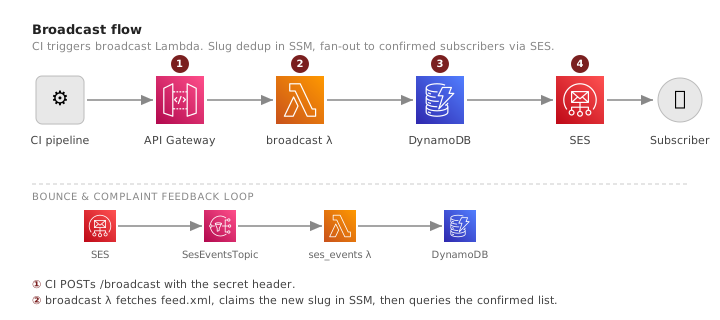
The broadcast function is where the interesting problem lives. Lambda functions are retried on failure. If the function crashes mid-send, AWS will re-invoke it. Without protection, every subscriber receives the email twice.
The naive fix is to check “did we already send for this post?” before sending. The problem: that check is a read. Between the read and the write, a concurrent invocation can pass the same check and both proceed to send.
The solution is the claim-before-send pattern: write the post slug to SSM before sending any email.
# 1. Check if this slug was already broadcast
last_slug = ssm.get_parameter(
    Name=SSM_PARAM
)['Parameter']['Value']
if post_slug == last_slug:
    return {
        'statusCode': 200,
        'body': 'No new post'
    }

# 2. Claim the slug before sending
ssm.put_parameter(
    Name=SSM_PARAM,
    Value=post_slug,
    Overwrite=True
)

# 3. Now send to all subscribers
for subscriber in subscribers:
    sesv2.send_email(...)
If the function crashes after the claim but during the send loop, the next retry sees the slug already written and exits early. The trade-off: a partial send on crash is not retried for the missed recipients. For a newsletter, this is the right call. Duplicates are worse than one missed send. If a crash happens mid-send, CloudWatch Logs show the last successful recipient. For a 200-person list, manually replaying from there is fast. For 10,000 subscribers, this is where the DLQ I mention later earns its keep.
The broadcast also uses the slug to detect new posts. It fetches the blog’s Atom feed, extracts the latest entry slug, and compares it against the stored SSM value. If they match, there is no new post and the function returns without sending anything.
Bounce handling: the part everyone skips
AWS will place your SES account under review if your bounce rate exceeds 5%, and can pause sending above 10%. Most tutorials skip bounce handling. Most production systems skip it too, until SES sends the account-under-review notice and broadcasts start failing.
The fix is two resources: an SES Configuration Set with bounce and complaint event routing, and a Lambda that processes the SNS notifications.
When SES detects a hard bounce or spam complaint, it publishes the
event to an SNS topic. The ses_events Lambda subscribes to that
topic and marks the affected subscriber in DynamoDB:
for record in event['Records']:
    msg = json.loads(
        record['Sns']['Message']
    )
    event_type = msg.get('eventType')

    if event_type == 'Bounce':
        recipients = (
            msg['bounce']
               ['bouncedRecipients']
        )
        new_status = 'bounced'
    else:
        recipients = (
            msg['complaint']
               ['complainedRecipients']
        )
        new_status = 'complained'

    for r in recipients:
        table.update_item(
            Key={'email': r['emailAddress']},
            UpdateExpression=(
                'SET #s = :s'
            ),
            ExpressionAttributeNames={
                '#s': 'status'
            },
            ExpressionAttributeValues={
                ':s': new_status
            },
        )
The broadcast function queries status = confirmed via the
status-index GSI. Bounced and complained addresses never appear in
that result set and never receive another send. This works because
DynamoDB GSIs re-index on every item write: updating status to
bounced removes the item from the confirmed partition
automatically. Your bounce rate stays clean without any manual list
hygiene.
Wiring this in SAM is a few lines:
SesEventFunction:
  Events:
    SesNotification:
      Type: SNS
      Properties:
        Topic: !Ref SesEventsTopic
SesEventsTopic is dedicated to bounce and complaint payloads from
SES. Stack alarms (broadcast errors, subscribe errors, DLQ depth)
publish to a separate OpsAlertsTopic with one email subscription
on the operator’s address. Splitting the two topics keeps alarm noise
from drowning out bounce/complaint events and keeps the
SesEventFunction from waking on every alarm transition.
The DynamoDB table design
One table, one primary key (email), three GSIs:
| GSI | Partition key | Used by |
|---|---|---|
| confirm-token-index | confirm_token | confirm handler |
| unsubscribe-token-index | unsubscribe_token | unsubscribe handler |
| status-index | status | broadcast handler |
The status-index GSI makes broadcast efficient. Instead of a full
table scan with a filter, the broadcast queries
status = confirmed directly on the GSI. DynamoDB returns only
confirmed subscribers, with pagination handled via LastEvaluatedKey.
All three GSIs use ProjectionType: ALL. The broadcast needs the
email address and unsubscribe token from each record, so projecting
everything avoids extra lookups.
Table billing mode: PAY_PER_REQUEST. At newsletter scale, provisioned
capacity would cost more than the entire rest of the stack. On-demand
billing means you pay nothing for idle periods.
The cost at scale
| Subscribers | Broadcasts/mo | SES sends | Monthly cost |
|---|---|---|---|
| 200 | 4 | 800 | ~$0.08 |
| 1,000 | 4 | 4,000 | ~$0.40 |
| 5,000 | 4 | 20,000 | ~$2.00 |
| 10,000 | 4 | 40,000 | ~$4.00 |
At 200 subscribers, 800 monthly sends cost $0.08 in SES. That is the entire bill. Everything else is free tier: Lambda invocations, API Gateway requests, DynamoDB on-demand, SQS standard-tier requests (the 1 M-requests-per-month free tier covers this stack’s lifetime traffic on a single laptop), one SNS email subscription, and the stack’s CloudWatch alarms (the first 10 alarms per account are free). SES at $0.10/1,000 is the only line that scales. Mailchimp at 10,000 subscribers costs $110-135/month. The AWS approach runs at roughly 3% of that.
For a deeper breakdown of how Lambda pricing works at scale, see how to reduce AWS Lambda costs.
Deploying with AWS SAM
The entire stack is a single template.yaml. No custom CDK constructs,
no Terraform module to install. SAM CLI requires the AWS CLI but
is a separate install.
sam build
sam deploy --guided
The --guided flag prompts for parameter values on the first deploy.
After that, sam deploy picks up the saved config. The stack outputs
the API Gateway endpoint URL. That URL goes into your subscribe form
and into your CI secret for triggering broadcasts.
The broadcast function is triggered by a POST to /broadcast with an
x-broadcast-secret header. My CI pipeline calls it after every
successful deploy. The function fetches the Atom feed, compares slugs,
and sends only if there is a new post.
What I would add next
A dead-letter queue on the broadcast function. The subscribe and welcome workers already have DLQs because each message is a single recipient and the retry semantics are clean. Broadcast is different: one invocation fans out to every confirmed subscriber, and if SES throttles mid-send, the loop exits with the slug already claimed in SSM. A DLQ plus a small “resume from email X” handler would replay the tail. For a 200-person list, reading CloudWatch Logs and manually re-invoking is fine. For thousands of subscribers, this is worth building.
SES account-level suppression list integration is the other gap. SES maintains its own suppression list for hard bounces. You can query it directly instead of tracking bounced status in DynamoDB, removing one piece of state to keep synchronized.
Owning the stack
Building your own newsletter infrastructure is less about saving $13/month than about owning the full stack: subscriber data, unsubscribe flow, email template, delivery timing.
Seven functions, two SQS queues, and one table, running at pennies a month that scale only with the emails you actually send.
For the serverless vs containers tradeoff behind this architecture, see Serverless vs Containers: A Decision Framework.