
TL;DR: Python’s GIL blocks ThreadPoolExecutor from parallelizing CPU-bound work, and standard multiprocessing crashes in Lambda due to /dev/shm restrictions. The fix:
lambda-multiprocessing(pipe-based IPC) with 4096MB+ memory to get enough vCPUs for real parallelism. This cut XML parsing from 16-25s to 7-11s.
The problem
We had a Lambda function processing ZIP files containing 80 to 150 complex XML documents. Each XML required schema validation, namespace resolution, and deep tree traversal, taking ~200ms to parse, resulting in 16 to 25 seconds of total processing time.
The obvious fix was to parallelize the parsing, which turned out to be surprisingly tricky in AWS Lambda.
Attempt #1: ThreadPoolExecutor (failed)
Our first instinct was to use Python’s ThreadPoolExecutor: it’s simple, built-in, and widely recommended.
from concurrent.futures import ThreadPoolExecutor

def parse_all_xmls(xml_files):
    with ThreadPoolExecutor(max_workers=4) as executor:
        results = list(executor.map(parse_single_xml, xml_files))
    return results
Result: No improvement whatsoever. Same 16 to 25 seconds.
Why it failed: the GIL
Python’s Global Interpreter Lock (GIL) allows only one thread to execute Python bytecode at a time. For CPU-bound work, threads simply take turns on the same core with no true parallelism.
What ThreadPoolExecutor actually does for CPU-bound work:
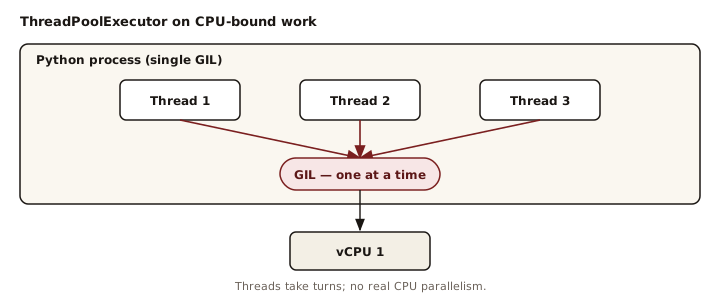
ThreadPoolExecutor does work well for I/O-bound tasks (S3, APIs, databases), where threads release the GIL while waiting on network responses. XML parsing is pure CPU work, so the GIL is never released.
Attempt #2: multiprocessing.Pool (crashed)
Since threads didn’t help, we tried true multiprocessing:
from multiprocessing import Pool

def parse_all_xmls(xml_files):
    with Pool(processes=3) as pool:
        results = pool.map(parse_single_xml, xml_files)
    return results
Result: Crashes or hangs in Lambda.
Why it failed: no /dev/shm
Standard Python multiprocessing relies on shared memory (/dev/shm). AWS Lambda severely restricts this space, leading to crashes, hangs, or unpredictable performance.
At this point, it was clear: parallelism in Lambda isn’t a Python problem; it’s an environment problem.
Attempt #3: lambda-multiprocessing (success)
The lambda-multiprocessing library avoids shared memory by using pipes for inter-process communication:
from lambda_multiprocessing import Pool

def _parse_single_xml(item):
    """Must be module-level for pickling."""
    filename, xml_content = item
    return parse_xml(xml_content)

def parse_all_xmls(xml_files):
    with Pool(processes=3) as pool:
        results = pool.map(_parse_single_xml, xml_files)
    return results
Why multiprocessing bypasses the GIL:
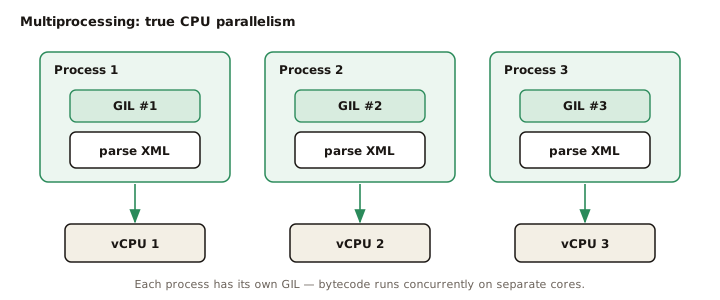
Important: If you’re processing fewer than ~5 items, multiprocessing is often slower due to process startup overhead. Parallelism only pays off once the workload is large enough.
The hidden gotcha: Lambda memory = vCPUs
Our first test with lambda-multiprocessing at 2048MB memory showed only 1.13x speedup, barely better than sequential. This was confusing at first: we had multiple worker processes, but almost no real performance gain.
The reason: Lambda allocates vCPUs proportionally to memory.
What happens at 2048MB (≈1.15 vCPUs):
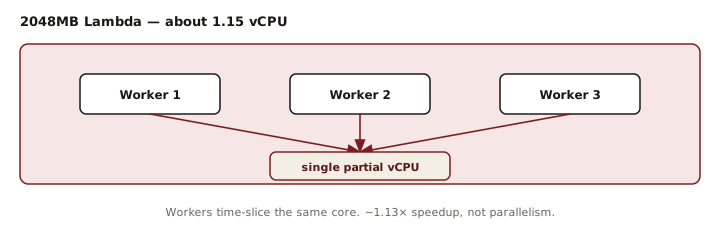
Real parallelism only starts around 4096MB, where Lambda provides ~2.3 vCPUs.
The final solution
4096MB memory + 3 workers consistently delivered real parallelism:
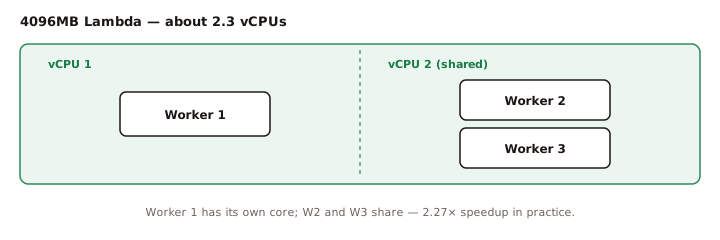
This reduced total parsing time from 16-25s down to 7-11s.
Speedup benchmark
| Memory | Workers | Sequential | Parallel | Speedup |
|---|---|---|---|---|
| 2048MB | 2 | 16.19s | 14.32s | 1.13x |
| 4096MB | 2 | 16.14s | 8.19s | 1.97x |
| 4096MB | 3 | 16.15s | 7.12s | 2.27x |
| 4096MB | 3 | 20.03s (152 files) | 8.82s | 2.27x |
Cost benchmark
| Config | Duration | Memory Cost/ms | Total Cost |
|---|---|---|---|
| 2048MB | 16s | 1x | 16 units |
| 4096MB | 7s | 2x | 14 units |
The cost table shows that doubling memory can actually reduce total cost when it cuts duration by more than half. For a deeper dive into Lambda pricing levers beyond memory sizing, see 10 Practical Tips to Reduce AWS Lambda Costs.
Summary: when to use what
Who this is for: Engineers running CPU-heavy workloads inside AWS Lambda who are surprised that “just add threads” didn’t work.
| Workload | Items per call | Use | Why |
|---|---|---|---|
| I/O-bound | any | ThreadPoolExecutor |
Threads release the GIL while waiting on I/O |
| CPU-bound | < 5 | Stay sequential | Process startup overhead beats the speedup |
| CPU-bound | 5+ | lambda-multiprocessing |
Pair with 4096MB+ memory for real parallelism |
Key takeaways
- ThreadPoolExecutor is for I/O, not CPU
- Standard multiprocessing breaks in Lambda
- lambda-multiprocessing works, with enough memory
- Memory size controls CPU parallelism
- Always benchmark; overhead matters
The lesson: performance tuning in Lambda is about how AWS slices CPU, memory, and process isolation, not about Python alone. Design with those constraints.
If you’re still deciding whether Lambda is the right fit for your workload, see Serverless vs Containers: A Decision Framework for a quick way to evaluate the tradeoffs.
Have you run into similar surprises with parallelism in Lambda? I’d love to hear what worked (or didn’t) in the comments.