The April post about how Claude Code reads PDFs had a central claim: tool boundaries shape agent behavior more than prompts do.
I believed it when I wrote it. I didn’t realize how much room the idea had to sharpen.
Since that post, pdf-mcp changed one default in pdf_search: instead of returning fixed-width snippets centered on the match, it now returns the containing structural block: the matching bullet, paragraph, or heading.
That one change altered the dominant agent workflow.
TL;DR: Switching pdf_search from snippets to paragraph excerpts changed the dominant agent pattern from “search, then read pages, then answer” to “search, then answer directly.” A 30-query benchmark across 5 PDFs showed 97% answer containment for paragraphs vs 80% for snippets. The win is structural precision, not more context.
From search-then-read to search-then-done
The April post described pdf_search as “the pivot tool.” It determined how many pages the agent read next. A good search result narrowed the follow-up pdf_read_pages call. A bad one triggered a broad scan.
That framing was accurate for snippets. Snippets gave the agent a 200-character window centered on the match. Enough to decide where to read, not enough to answer the question. The agent always needed a follow-up call.
With paragraph excerpts as the default, pdf_search is now often the terminal tool. The agent reads the returned paragraph, finds the answer in it, and responds. No pdf_read_pages call.
The three-step pattern from the original post:
pdf_search → pdf_read_pages → answer
Compressed to:
pdf_search → answer
Same thesis, stronger version: tool boundaries shape agent behavior, and a better boundary removed an entire step from the workflow.
What paragraph mode actually does
We originally pitched paragraph excerpts as “more context than snippets.” Testing showed the opposite.
On structured documents (bullet lists, numbered items, exam guides), paragraph excerpts are shorter than snippets. A query about AWS guardrails on the exam guide returned 332 characters in snippet mode: three bullet points mashed together with adjacent noise. Paragraph mode returned 216 characters: just the one matching bullet.
The win was less ambiguity, not more context.
On prose-heavy documents, paragraphs can run longer (up to 2,000 characters for dense academic writing). But the content is a complete thought, not an arbitrary window that starts mid-sentence and ends mid-clause.
The honest framing: structural excerpts are not “more context.” They are context aligned to document structure. Better for structured documents, neutral-to-worse for prose with figure captions.
Length distributions tell the story:
- Snippet: average 249 chars, all results in the 100-299 character bucket. Uniform because the window size is fixed.
- Paragraph: average 424 chars, spread across buckets from under 100 to over 1,000. Variable because document structure is variable.
That variance is the point. A heading returns 40 characters. A dense paragraph returns 800. The excerpt length adapts to the structural unit instead of obeying an arbitrary constant.
In RAG terms, this is a chunking problem: arbitrary windows versus semantic structural units. The same tradeoff appears in section chunking vs page chunking, just at a different granularity.
The benchmark that justified the default
Making paragraph mode the default instead of opt-in needed data, not intuition.
We built a 30-query corpus across 5 PDFs: the Transformer paper, GPT-3, a GNN review, an LLM survey, and the AWS Solutions Architect exam guide. Each query has a known answer substring. The metric is containment rate: does the returned excerpt contain that substring?
Results:
| Paragraph | Snippet | |
|---|---|---|
| Transformer | 100% | 70% |
| GPT-3 | 100% | 100% |
| GNN Review | 100% | 100% |
| LLM Survey | 80% | 80% |
| AWS Exam Guide | 100% | 60% |
| Overall | 97% | 80% |
Zero regressions. Paragraph wins on 2 PDFs, ties on 3, loses on none. The 97% vs 80% gap is driven by the structured documents (Transformer, AWS Exam Guide) where snippets cut across structural boundaries.
The benchmark script is at scripts/benchmark_excerpt_quality.py in the pdf-mcp repo.
The discipline that made the difference
The final numbers almost didn’t happen.
The first benchmark used a single PDF (the Transformer paper) and showed 90% paragraph vs 60% snippet. A 30-point gap. Compelling enough to ship.
But single-PDF benchmarks overstate. Expanding the corpus to 5 PDFs narrowed the gap to 97% vs 80%. Still clear, but more honest. More importantly, the expansion surfaced ground-truth errors: two queries had the wrong expected page numbers. The re-benchmark with corrected ground truth gave the real signal.
The loop:
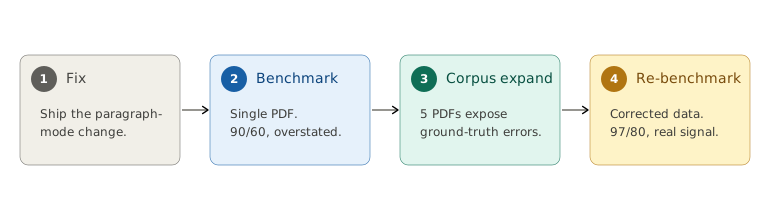
Each step caught something the previous missed. The single-PDF benchmark overstated the gap. The expanded corpus exposed ground-truth errors. The corrected ground truth gave the number we could actually stand behind.
Without steps 2 through 4, we would have shipped paragraph mode with a 90/60 headline that overstated the real gap by 10 points. The discipline of expanding the corpus and re-benchmarking with corrected data is what separates “we think it’s better” from “we measured it.” That same evaluation muscle is what makes using the LLM itself as a QA tool practical: you need a ground truth before you can trust the signal.
This is the same evaluation discipline behind testing AI agents before they break production: if you can’t measure the change, you can’t justify the default.
The bug that almost shipped
The first implementation of paragraph mode had a clean design. FTS5 returns a keyword snippet. Use str.find() to locate that snippet in the page text. Walk the block boundaries to find the containing paragraph. Return the paragraph.
It worked on every test case until it didn’t.
The failure: pages with repeated phrases across blocks. A bullet list where three items share the same technical term. str.find() returns the first occurrence in the page text, which might be in block 1. The actual FTS5 match was in block 3. The returned paragraph didn’t contain the search terms.
The naive version:
# First cut: find the FTS5 snippet, walk to its block.
offset = page_text.find(snippet)   # first occurrence wins
paragraph = block_containing(page, offset)
# On a page with a repeated term, find() locks onto
# block 1 even when the real FTS5 match is in block 3.
# The returned paragraph never contains the query.
This is the kind of bug that passes unit tests. It only shows up on documents with enough structural repetition. The kind of documents where paragraph mode matters most.
Three fixes, each catching what the previous missed:
-
Query-token-overlap scoring. Instead of string matching, score each candidate block by how many query tokens it contains. Repeated phrases stop mattering because the correct block contains the highest concentration of query terms.
-
80-character minimum-length floor. Short blocks (headings, captions, page numbers) are poor excerpts even when they match. The floor skips them in favor of substantive text. This prevented a class of bugs where a section heading containing the search term was returned instead of the paragraph underneath it.
-
Hybrid-mode containment anchor. In hybrid mode (keyword + semantic), the keyword path returns an FTS5 snippet. Before walking blocks, check if any block directly contains that snippet. If so, use it. This anchors the selection on FTS5’s own judgment before falling back to overlap scoring.
Fixes 1 and 2 collapse into one pass. Score every block by distinct query-token hits, skip anything under the floor:
tokens = [t for t in query.lower().split() if t]
best_score, best = 0, None
for block in text_blocks:
    if len(block.strip()) < 80:   # headings, captions
        continue
    hits = sum(1 for t in tokens if t in block.lower())
    if hits > best_score:
        best_score, best = hits, block
Repeated phrases stop mattering: the block with the most distinct query terms wins, wherever it sits on the page.
Known limitations
Paragraph mode is the default. It is not universally better. Honest accounting:
Semantic search may pick the wrong block. Pure semantic mode (conceptual paraphrases, no keyword overlap) can select a topically related block that isn’t the optimal one. The overlap scorer favors lexical matches. Queries that rephrase the document’s language may land on a related-but-not-best paragraph.
Figure captions compete with body text. On prose pages with embedded figures, the caption may contain the search terms more densely than the surrounding paragraph. The overlap scorer picks the caption. This is technically correct (the caption does match) but not what the user wanted.
Tables are invisible. Paragraph mode walks text blocks. Table content lives in a different extraction path. If the answer is in a table, paragraph mode won’t find it. Use pdf_read_pages for table-heavy documents.
The 2,000-character cap was never hit. We set a ceiling on excerpt length to prevent runaway paragraphs. In 30 queries across 5 PDFs, no paragraph exceeded it. The cap exists as a guardrail, not as an active constraint. If your PDFs have unusually long paragraphs, the cap will truncate them, and you should know that going in.
What this reinforces
The April post argued that tool boundaries shape agent behavior more than prompts. This update is a stronger version of the same idea: changing one output format in one tool eliminated an entire step from the dominant workflow.
The agent didn’t need a new prompt or a new tool. It needed a better answer from the tool it already had.
If an agent repeatedly chains tools, the issue may be that no single tool returns a complete enough unit of meaning rather than anything about its reasoning. Fix the output and the workflow collapses on its own.
For the full backstory on how pdf-mcp’s tool design evolved, see the original post. For the search architecture decisions behind hybrid and keyword modes, see Hybrid Search vs Query Routing.