
Most document knowledge bases start with infrastructure: an ingestion pipeline, a vector database, a chunking strategy, a sync job to keep them honest. Mine starts with mkdir. Point an AI agent at a folder of PDFs with the right tools underneath, and the folder already is the knowledge base: searchable in one call, cached per file, honest about what it covered. A knowledge base, for an agent, is not software you build. It is documents plus a way to navigate them.
I build pdf-mcp, an open-source MCP server I use daily through Claude Desktop and Claude Code. Its corpus tools search a 100-PDF folder in one sub-second call; how the cross-document ranking works, and the benchmark behind it, get a deep dive of their own. This post is the other half: the workflow that turns those tools into a personal knowledge base you actually use.
TL;DR: A folder of PDFs plus three corpus tools is a working knowledge base: no ingestion pipeline, no vector store, no deploy. The workflow is four habits: structure (one folder per topic), warm (front-load extraction on a time budget), catalog (generate an INDEX.md from triage cards), query (semantic for questions, keyword for exact terms, then read the winning pages). Measured against Amazon Bedrock Knowledge Bases on 184 graded queries at an equal token budget, it scores higher on two query classes and level on the other two.
Want to see it first? The live demo runs a corpus search over a six-PDF sample folder in your browser. Ready to try it on your own files? pip install pdf-mcp, then see Start tonight.
The folder is the source of truth. The cache is a disposable projection. The agent is the retrieval system.
The pipeline you were about to build
Ask how to give an agent a document knowledge base and the standard answer is infrastructure:
docs -> chunker -> embedder -> vector DB -> sync job -> agent
Every box is something to configure, deploy, and keep consistent with the folder it mirrors. For a personal corpus of tens to hundreds of files, the pipeline is not just overkill. It is a second copy of your knowledge base that drifts from the first.
The zero-infrastructure version:
folder -> agent
Why does this work at all? All that RAG infrastructure exists to give retrieval a representation of your documents it can search quickly: extracted text, embeddings, an index. pdf-mcp builds the same representation lazily, inside a local SQLite cache: extracted text, OCR output, optional page embeddings, metadata. The difference is architectural, not cosmetic. An ingested store is a second source of truth you have to protect and keep synchronized. The cache is a disposable projection of the folder: delete the cache and you lose nothing but recompute time; delete the folder and everything is gone.
I also measured what skipping the pipeline costs in retrieval quality. I ran the same 184 graded queries through this folder setup and through Amazon Bedrock Knowledge Bases, the managed version of that pipeline, in two configurations, with every arm capped at the same 2,000 tokens of returned text. The score is span recall: whether the returned text contains the hand-labeled answer.
| query class | n | folder + pdf-mcp | Bedrock defaults | Bedrock tuned |
|---|---|---|---|---|
| described (concept, no shared words) | 83 | 0.289 | 0.301 | 0.253 |
| needle (one page of one document) | 31 | 0.806 | 0.484 | 0.645 |
| spread (answer across documents) | 45 | 0.644 | 0.422 | 0.511 |
| trap (similar but wrong document) | 25 | 0.880 | 0.880 | 0.960 |
Against Bedrock’s defaults the folder scores higher on needle and spread, with 95% confidence intervals that exclude zero, and the other two classes are too close to call. Against the tuned arm, which uses 1,000-token chunks plus a Cohere reranker, no class shows a difference the intervals can separate from zero. That column is pdf-mcp on its default settings. With excerpt_style="auto", needle rises to 0.903 and spread to 0.733, and the gap on those two classes clears zero against both Bedrock arms. In no configuration does the folder score measurably lower. I built the tool and ran the benchmark, so read this as evidence that the folder holds up next to a managed pipeline, not as a ranking of the two. The first run went the other way: Bedrock came out ahead, and the misses exposed two bugs I had never tested for.
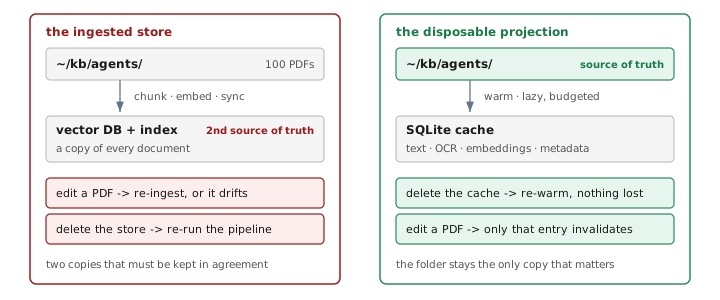
Which means folder operations are the knowledge-base operations. Adding a document is cp paper.pdf ~/kb/agents/. Removing one is rm. Editing one invalidates exactly that file’s cache entry, because the cache is keyed on path plus modification time. There is no second copy to drift. The rest of this post is the four habits that make this arrangement work as well as the diagram suggests.
Structure: one folder per topic
A corpus in pdf-mcp is whatever you point it at: a directory, or an explicit list of files, up to 100. The 100-file cap is intentional: it pushes each corpus toward a single topic, which keeps retrieval quality high without any routing infrastructure. The habit: one folder per topic.
~/kb/
  agents/        # papers on agent architectures
  aws/           # service guides, whitepapers
  blog-sources/  # references behind my posts
  hardware/      # datasheets
Setting this up takes one install and one config line, covered in Start tonight.
Each folder is one corpus, so query scope is a deliberate choice: ask about retry backpressure inside agents/ and datasheets never pollute the ranking. Want everything? Pass the parent with recursive: true.
Topic folders are the free version of query routing: you route by choosing the directory. Retrieval quality degrades when a corpus is full of documents that could never answer your queries; the benchmark behind these tools includes 79 pure-distractor documents to stress exactly that.
Two constraints upfront. Corpus tools take local files only: web PDFs get downloaded into the folder first. And filenames are part of the interface: 2602.03442v1.pdf tells you nothing in a triage card or a search result. Rename files when you file them. More on why below.
Ingest: drop the file in, then warm
There is no ingest step, but there is a warm step, and the difference is the point. pdf_corpus_warm front-loads the work the first query would do anyway: text extraction, OCR where needed, page embeddings if you pass embeddings: true, all cached per file. If that sounds like ingestion wearing a different name, apply the source-of-truth test: warming creates nothing that cannot be rebuilt from the folder. An ingestion pipeline’s output is a store you must protect and synchronize. A cache is something you are allowed to lose.
The mechanics fit in one block. Warming runs against a wall-clock budget (45 seconds by default); whatever fits is cached, whatever does not is listed by name in unprocessed, and calling again continues where the last call stopped. The field to loop on is warm_complete:
pdf_corpus_warm ~/kb/agents/ (embeddings: true)
  -> warmed 40, unprocessed 60, warm_complete: false
pdf_corpus_warm ~/kb/agents/ (embeddings: true)
  -> warmed 40, unprocessed 20, warm_complete: false
pdf_corpus_warm ~/kb/agents/ (embeddings: true)
  -> warmed 20, unprocessed 0, warm_complete: true
An empty unprocessed is not the same signal. A file that fails, a password-locked PDF for instance, lands in skipped instead, so unprocessed can reach zero while documents are still missing. For a large first warm there is also pdf-mcp-warm, a command-line entry point that warms a folder to completion outside any MCP client and its per-call timeout.
Cold is the only expensive pass. Warming extracts documents concurrently, so text extraction across the full 100-document, 2,238-page benchmark corpus takes under 30 seconds on my laptop, and caching page embeddings on top of that is a second, slower pass: call it a few minutes of one-time work, split across as many warm calls as your budget needs. After that, the API contract is explicit: cached documents are free. Which enables the habit that makes the whole thing feel instant: warm at the start of a work session. If nothing changed, the call is a cheap no-op. If you dropped three PDFs in yesterday, they get picked up now instead of during your first question.
Catalog: an INDEX.md any session can read
A federated-search survey I collected while benchmarking these tools lives on my disk as now.pdf: 113 pages, an embedded metadata title that is literally empty, zero TOC entries. The filename lies. The metadata is blank. The PDF itself knows what it is, but nothing outside it does. Every collection accumulates files like this. The fix is a catalog you generate instead of maintain.
pdf_corpus_overview returns one triage card per document: embedded title, page count, the top table-of-contents entries, text coverage, file size. The habit: after filing new documents, have the agent run an overview and write the result into an INDEX.md in the folder.
## agents/ (14 docs)
- a-rag-agentic-retrieval.pdf . 24 pp
  "A-RAG: Agentic Retrieval..." . TOC: Intro,
  Method, Multi-hop Evaluation
- multi-agent-orchestration-aws.pdf . 38 pp
  "Multi-Agent Orchestration..." . TOC: Patterns,
  Supervisor, Handoffs
This one file does two jobs. It answers “what do I actually have?” without opening anything. And it gives every future agent session a table of contents for the knowledge base that costs nothing to read: the next conversation orients from the catalog instead of re-discovering the corpus from scratch.
The catalog is only as good as what your PDFs carry, and now.pdf is the proof: its triage card shows a page count, a file size, and nothing else anyone could recognize, because the card can only show what the document carries. That is the hygiene argument in one file. Rename PDFs when you file them, and treat a blank card as a prompt to fix the file, not the tool.
Query: locate with the corpus, read the document
When I ask a question now, I do not think about files. I ask: which of these papers discusses retry backpressure? The agent searches the corpus, gets back a ranking that names a document and its pages, reads the two pages that matter, and answers with a page-level citation. Corpus tools locate. Document tools read. That two-call loop is the entire runtime workflow, and it is RAG in the only sense that matters, retrieval feeding generation, with none of the machinery the acronym usually drags in. It is also what keeps a corpus this size usable at all, since sending whole documents to the API runs out of context long before the published page cap.
The habit worth building is mode choice. Semantic for questions and concepts: “how do agents hand off tasks between each other.” Keyword for exact terms: an error code, a part number, “clamping voltage”, a person’s name. Hybrid, the default once embeddings are cached, fuses both with Reciprocal Rank Fusion; in a 100-document benchmark it put a gold document in the top 3 on 84.8% of 184 graded queries, at a mean 0.30 seconds each. For a deeper treatment of when each mode wins, see semantic vs keyword search.
One kind of question does not fit the two-call loop: the kind that spans documents. “How did the guidance change across all three years?” cannot be answered from a single ranked list, because whichever document matches hardest takes most of the ten slots and the rest go unrepresented. Ask those once per document, passing a path instead of the folder, and combine the answers. The ranking tells you which documents to ask: doc_match_counts names every document with matching pages, including ones that never reached the hit list, so a document listed there but missing from the matches is a query you still owe.
For anything you will quote or cite, paragraph-style excerpts return the bounding box of the matched block, so the exact region can be rendered as visual proof. Paragraph excerpts changed how my agents behave covers why block-level excerpts beat fixed windows; the short version is that the agent quotes a coherent paragraph instead of a snippet sliced mid-sentence.
The coverage report is the feature you did not know to ask for
Every corpus search returns a coverage report alongside the ranking:
"coverage": {"searched": 100, "corpus": 100}
This looks like telemetry. It is the difference between an answer and a guess. An agent that searches whatever happens to be cached will answer from that slice with full confidence, and nothing in the answer tells you a third of the corpus was invisible. With an explicit coverage report, partial coverage is a fact in context: the agent can warm the stragglers and re-search, or tell you the answer covers 61 of 100 documents. When I evaluate any retrieval tool now, this is the first thing I look for, and it is almost never there.
Where the folder stops
The honest boundaries, because this workflow has them:
- Past 100 files per corpus, split by topic or accept that you have left the regime this design is correct for. The cross-document ranking post covers where fusion stops helping and when a vector database is the honest answer.
- Near-duplicate documents are the hardest case for this design, and the one that surprised me. A folder holding the same annual report for three fiscal years retrieves the right company and the wrong year often enough to matter: on a corpus of 24 such filings, reading the top-ranked pages raised misattribution instead of lowering it, because the pages it imported came from a confusable year. Give each year its own corpus, or name the year in the query.
- Born-markdown notes want a different pattern. If your knowledge base is notes you write rather than PDFs you collect, the agent can read and edit the files directly, and a plain index file it maintains itself replaces the search layer. The folder-corpus workflow is for documents you cannot rewrite: papers, datasheets, contracts, scans.
- A team knowledge base with many writers and shared access is a service, not a folder. This workflow is single-machine by design.
Start tonight
To see the loop before installing anything, the live browser demo runs a corpus search over a six-PDF sample folder, ranking and page hits included, right in the browser. When you are ready to point it at your own folders, the setup is one install and one config line:
pip install pdf-mcp
claude mcp add pdf-mcp -- pdf-mcp
Then make the smallest corpus that would help you tomorrow. Mine was blog-sources/: the papers and guides behind my posts, so researching a new one starts with a corpus search over everything I already collected instead of re-finding it on the web. Drop in the PDFs, warm once, generate the INDEX.md, and ask the question you actually have.
No pipeline shipped, no database deployed, no sync job to babysit. The folder is the source of truth. The cache is a disposable projection. And the next time someone tells you a document knowledge base starts with infrastructure, you know the shorter answer: it starts with mkdir. The infrastructure was never the knowledge base; the documents were.