
Point Claude Code at your Redmine backlog in auto mode and it stops summarizing tickets and starts working them:
> work the overdue tickets in Cartly

● redmine-mcp-server - list_redmine_issues (MCP)
  ⎿ #622  high   · unassigned · due 2026-07-24
    Push notifications silently dropped on Android 14
    #621  normal · Sam Ruiz   · due 2026-07-25
    Checkout E2E test flakes on the promo-code path

● #622 first. Highest priority, longest overdue,
  and nobody owns it.

● redmine-mcp-server - get_redmine_issue (MCP)
  ⎿ open · unassigned · 1 journal from Sam Ruiz

● The journal has the answer already.
  FirebaseMessaging stops getting callbacks right
  after a ForegroundServiceStartNotAllowedException,
  about 30 minutes in. That is Android 14's
  foreground-service timeout, so the fix belongs in
  the notifications module, not in the delivery
  retry logic.

● redmine-mcp-server - update_redmine_issue (MCP)
  ⎿ #622 → in-progress · assigned Maya Chen
    comment added
Those are real calls against a Redmine instance, seeded with test tickets. The agent pulled the overdue list, picked the one nobody owned, read a colleague’s note buried in the issue history, worked out that the bug sat in a different module than the reporter assumed, and wrote that back where the team will see it. Three tool calls, and the conclusion lives in the tracker rather than in a chat log.
Redmine stays the record of what the team is doing, and the agent writes into it directly.
Auto mode is also where an MCP server stops being a convenience and turns into a liability, because nobody is reading each call before it fires. Point an agent at a wrapper generated from Redmine’s OpenAPI spec and it will reach for list_issues when it wanted search_issues, filter on a field that endpoint ignores, get an empty array, and record a note saying nothing is blocking the release. Nothing errors. The wrong answer lands in your issue tracker with a timestamp on it.
Everything below is about the two properties that make unattended use survivable: a tool surface small enough that the agent picks correctly, and guardrails that live in the server where a prompt cannot argue with them.
I maintain redmine-mcp-server, an open-source MCP server with 51 curated tools, downloaded roughly 34,000 times and running against production Redmine instances since May 2025, with outside contributors who report bugs from their own deployments.
TL;DR: redmine-mcp-server connects any MCP client to Redmine with 51 curated tools covering issues, time tracking, wiki, search, and files. It ships OAuth2 per-user identity, a server-level read-only mode, and prompt injection boundaries. The design choice that matters is what it leaves out.
Full API coverage is not a feature. It is a tool-selection tax.
Why not just mirror the REST API
Redmine has a full REST API and an OpenAPI spec. Generating one MCP tool per endpoint is a weekend of work, and several servers in this space advertise near-total coverage as the headline feature.
Call that the API mirror. It is the most intuitive design available, and it makes the agent worse at the one thing you need it to do.
The reason is mechanical rather than philosophical. Every tool description occupies part of the model’s context window before the first prompt is even sent. Descriptions of sibling operations then converge until the model cannot separate them. list_issue_categories, create_issue_category, update_issue_category, and delete_issue_category are four entries the agent must discriminate every time categories come up. Under about forty it reads them and picks correctly. Past that it starts guessing, and the guesses get worse as the count climbs.
An API mirror optimizes for the maintainer, who gets coverage for free. A curated surface optimizes for the agent, which has to choose. Only one of those is your problem at runtime.
The same instinct drove the first version, which exposed two read-only tools and refused to auto-generate the rest. That decision is in connecting a legacy system to AI agents with MCP.
The tool surface
| Group | Covers |
|---|---|
| Issues | Full lifecycle, plus relations, watchers, notes and categories |
| Projects | Create and close, plus members, roles, versions, custom fields |
| Time tracking | Entries, activities, bulk import |
| Search, wiki and news | Cross-project search, wiki pages and hierarchy, news |
| Files | Attachments, expiring download links, single-use upload URLs |
| MCP Apps | Triage board, project dashboard |
| Gantt and lookups | Chart data, plus the enumerations agents need to fill fields |
| Plugin-gated | Checklists, Products, CRM contacts and deals, Helpdesk, DMSF |
Fifty-one tools is a deliberate number, not a milestone. An earlier version exposed 69, because open-source contribution adds tools faster than architecture absorbs them. Grouping related operations recovered tool selection without losing a capability, which is what MCP tool sprawl: how I cut 69 tools to 43 is about.
The plugin groups only appear when you enable them. If you do not run RedmineUP CRM, those tools are not in your agent’s context at all. With every plugin on, the count is 65.
If 51 is still more than one agent needs, REDMINE_MCP_ALLOW_TOOLS exposes only the tools you name.
When you want a human in the loop
Triage is a judgment call, and judgment calls go better when someone can see the whole board at once. In Claude Desktop, asking for the board draws it inside the conversation:
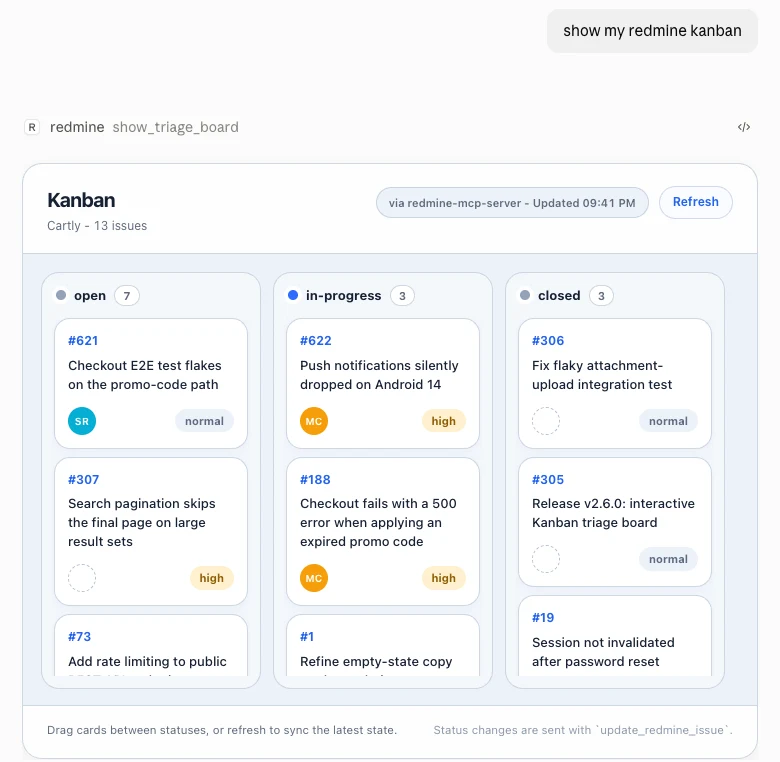
Drag a card to another column and the agent writes the status change through update_redmine_issue. If Redmine rejects the transition, the card snaps back and says why. With REDMINE_MCP_READ_ONLY=true the dragging turns off, because that guardrail sits in the server rather than in the prompt.
show_project_dashboard is the read-only companion: open versus closed, overdue, due this week, priority breakdown, recent activity, and clicking any figure drills into the matching issues in-panel.
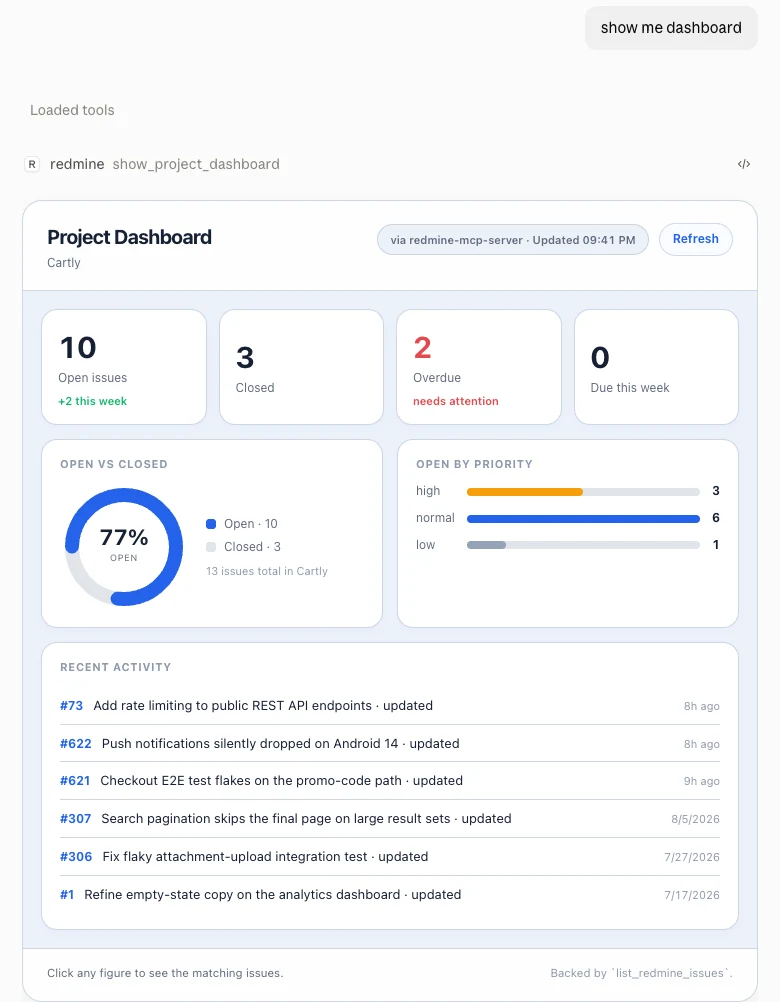
Both arrive through the MCP Apps extension, so they render in Claude Desktop, claude.ai, VS Code Copilot, and the other hosts that support it. Claude Code, being a terminal, gets summarize_project_status instead, which writes the same picture as prose.
What else you can ask it
Time tracking is usually the first thing an operations reader tries, and the first thing most MCP integrations for project tools skip:
> how much time went into Cartly this month,
  by person?

● redmine-mcp-server - list_time_entries (MCP)
  ⎿ 10.0 h · 5 entries · 3 people
    Sam Ruiz      4.0     Maya Chen     3.0
    Alex Rivera   3.0
That question only works if time entries are exposed, and they connect to billing and capacity planning, so their absence is not a small gap.
Two more that only pay off once the surface is coherent. “Where else have we seen this stack trace?” goes through search_entire_redmine and covers issues, wiki, and documents in one call instead of a per-project hunt. “Summarize the deployment runbook and flag anything contradicting current infra” reads wiki pages through manage_redmine_wiki_page(action="get") and reconciles them against whatever else the agent can see.
Install it in two lines
pip install redmine-mcp-server
redmine-mcp-server
Point REDMINE_URL and REDMINE_API_KEY at your instance and the server comes up on port 8000 with the MCP endpoint at /mcp. The README has Docker, TLS, and the nearly sixty variables you will not need on day one, and how to deploy a Python MCP server covers putting it behind a proxy.
Start with REDMINE_MCP_READ_ONLY=true. Turning it off later is one line. Explaining an agent-created mess to your project managers is not.
Multi-user access without a shared key
With a single shared API key, everyone using the server acts as one Redmine user. Same project visibility, same audit trail, no way to answer who did what. Fine for a personal tool, wrong for anything a team touches. OAuth2 mode gives each user their own Redmine identity, and their own permissions arrive with it.
OAuth needs Redmine 6.1 or later. On an older Redmine or on Easy Redmine, api-key-login mode gets the same result another way: each user pastes their API key once into a login page, and every tool call then runs as that user.
Getting there cost me an outage.
OAuth2 discovery means advertising which scopes you intend to request. I generated those from a naming convention: the tool surface uses manage_wiki, manage_versions, manage_files, so documents became manage_documents. Symmetric, readable, wrong. Redmine’s documents subsystem uses the granular add_documents, edit_documents, delete_documents triad. Redmine 6 validates advertised scopes against its real permission list, so /oauth/authorize refused the consent request:
invalid_scope: requested scope is invalid, unknown, or malformed
Login did not work for any client requesting the full scope set. A contributor found it by running the flow against a real Redmine 6 instance. The test suite never had a chance: every test mocked the thing that would have caught it, and a mock built from my assumption confirmed my assumption.
So the scopes are not inferred anymore. Every scope the server advertises is checked in CI against a committed snapshot of Redmine’s actual permission list, so the next convention-shaped guess fails on my machine instead of at your consent screen. That guard is the part worth having, and it only exists because the flow broke somewhere real.
Safety, when the agent can write
An agent working tickets unattended reads text that anyone with a Redmine login can write, and then acts on it. Issue descriptions, journal notes, wiki pages: all of it arrives in the model’s context, and all of it is user-controlled. In a supervised chat you would notice an instruction smuggled into a bug report. In auto mode nobody is looking.
So every piece of user-controlled text coming back from Redmine gets wrapped in boundary tags with a random identifier before it reaches the model. The tags tell the model it is looking at data from an untrusted source, not at instructions. The full threat model is in 8 vulnerabilities I found auditing my own MCP server.
REDMINE_MCP_READ_ONLY=true is the other half, and it is why the flag exists at the server instead of in a system prompt. A note buried in an issue description can talk an agent out of an instruction. It cannot unset an environment variable.
The bug that taught me to distrust type signatures was smaller and worse. Python treats True as an int, so an agent passing role_ids=[True] to a membership call did not fail validation. It assigned role ID 1, which on most Redmine instances is an elevated role. A confused agent could hand out permissions by getting a type slightly wrong, and nothing in the stack would object.
Positive-integer validation now covers role, user, and group IDs everywhere they appear. That class of bug is why driving the server with an LLM found 17 things the tests did not, and why the safety work landed before the users did, which is the arc in what it takes to ship an MCP server to production.
How to choose one
Half a dozen Redmine MCP servers exist, in Python and TypeScript, and a few of them are good. Three questions separate them, and none of them is the tool count.
| Ask | Why it matters | What good looks like |
|---|---|---|
| How is the tool surface shaped? | Whether the agent picks correctly | Operations grouped by domain, not one tool per endpoint |
| Whose identity does it use? | Permissions and audit trail | Per-user identity, not one shared API key |
| Where is read-only enforced? | Whether it holds under pressure | Refused at the server, not requested in the prompt |
The third one catches people out. Read-only enforcement written into a system prompt is not read-only, because a sufficiently persuasive issue description will talk an agent past it. It has to be refused somewhere the prompt cannot reach.
This server answers those with 51 grouped tools, five auth modes, four of them per-user, and server-side read-only. If a different one answers them better for your setup, use that one.
What the surface is for
Connecting an agent to Redmine is easy, which is exactly why so many servers do it. The REST API is right there and a generated wrapper works on the first try.
What breaks later is choice. Every tool you expose is one more thing the agent rules out before acting, and the failure mode is never an error message. It is a confident call to the wrong tool, on a system your team treats as the record of what is actually happening.
pip install redmine-mcp-server
Source: github.com/jztan/redmine-mcp-server
Connectivity was solved years ago. Choosing well was not.