I wanted a zero-infrastructure RAG pipeline. Upload some documents, point an LLM at them, get answers. No vector store provisioning, no embedding pipeline, no chunking logic to maintain. AWS Bedrock Knowledge Bases promised exactly that. I had it running in 20 minutes. Then I got my AWS bill.

This post covers what the setup actually looks like, what surprised me, and what I’d want to know before spinning one up again. If you’re still sorting out where RAG fits alongside agents, see Generative AI vs Agentic AI: A Builder’s Framework.
What I Built
A Q&A bot for my study notes. The idea was simple: upload a collection of Word and PDF files, let AWS handle the embeddings and retrieval, and let Claude answer questions using those documents as context.
Bedrock Knowledge Bases handles the full RAG pipeline behind the scenes. It chunks your documents, generates vector embeddings using Amazon Titan Embeddings, stores them in a managed OpenSearch Serverless collection, and retrieves relevant chunks at query time to feed into the LLM. You don’t provision any of this yourself. You point it at an S3 bucket and it handles the rest.
Setup: Surprisingly Fast
The console workflow took about 20 minutes from start to first query. Here’s what those 20 minutes looked like:
I created an S3 bucket and uploaded my documents. Then I created a new Knowledge Base in the Bedrock console, selected the S3 bucket as the data source, and chose Titan Embeddings as the embedding model. Bedrock automatically provisioned an OpenSearch Serverless collection as the vector store. I clicked “Sync” to kick off the ingestion pipeline, which chunked the documents, generated embeddings, and loaded them into the vector store. Within a few minutes I was testing queries in the console’s built-in playground.
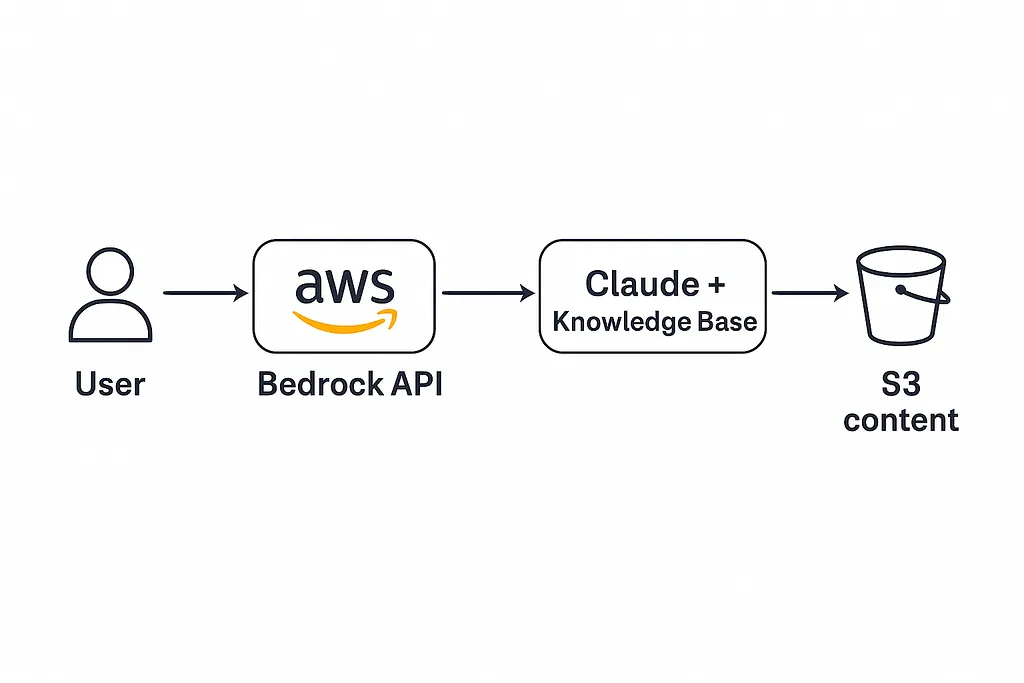
For a managed service, that’s a remarkably low barrier to entry. No IAM role gymnastics, no CloudFormation templates, no capacity planning. It just worked.
Five Things I Didn’t Expect
File format limitations hit early. I had to preprocess my Word files into plaintext before Bedrock could ingest them reliably. PDFs were hit-or-miss. Clean text-based PDFs worked fine, but anything with figures, tables, or embedded images produced garbled chunks. If your documents aren’t plain text or simple PDFs, budget time for preprocessing.
No visibility into chunks or embeddings. You can’t inspect what’s actually stored in the vector store. There’s no way to see how your documents were chunked, what the embeddings look like, or why a particular chunk was (or wasn’t) retrieved for a query. When the LLM gives a weak answer, you can’t tell whether the problem is retrieval, chunking, or the model itself. It’s truly a black box.
No custom chunking logic. At the time I tested this, Bedrock Knowledge Bases only supported fixed-size chunking. There was no option for semantic chunking, sentence-boundary chunking, or custom splitting logic. If your documents have natural section breaks (like headers or numbered items), the fixed-size chunker will split across them without regard for meaning.
Model choice is constrained. Only certain foundation models support Knowledge Base Q&A. Claude worked well and produced strong answers, but if you wanted to use a Titan text model or had specific model version requirements, the options were limited. This matters less now that the supported model list has grown, but it was a friction point at launch.
OpenSearch Serverless costs add up fast. This was the biggest surprise. I’ll cover it in detail below, but the short version: “serverless” does not mean “scales to zero,” and the minimum cost is higher than you’d expect for a prototype.
The Hidden Cost of “Serverless”
When Bedrock creates a Knowledge Base, it provisions an OpenSearch Serverless collection behind the scenes. OpenSearch Serverless bills in OpenSearch Compute Units (OCUs), and the minimums are not small.
You need at least 2 OCUs for indexing and 2 OCUs for search, for a baseline of 4 OCUs running at all times. Each OCU costs roughly $0.24 per hour. That’s about $0.96 per hour, or around $700 per month, just for the vector store to exist. This baseline runs whether you’re sending a thousand queries a day or zero.
For production workloads with steady traffic, this pricing can make sense. But for a prototype, a study project, or anything you’re experimenting with, it’s a steep floor. I didn’t notice it until my bill arrived because the console doesn’t surface this cost clearly during setup.
The broader lesson: managed services trade visibility for convenience. That tradeoff is usually worth it. But the bill is where you find out what “managed” actually costs. Always check the pricing model for underlying resources, not just the service you’re configuring.
This points to a deeper architectural principle. The more abstraction a service provides, the harder it becomes to debug retrieval quality, chunking behavior, and cost drivers. At small scale, that’s fine. At large scale, it becomes architecture you need to understand anyway.
What Worked Well
Claude’s answers were surprisingly strong, especially when the source documents were well-organized and free of formatting clutter. Multi-hop queries that required synthesizing information from multiple documents returned coherent, well-sourced responses.
Latency was reasonable. Even queries that pulled from several chunks came back in a few seconds, which is fine for internal tools and async workflows.
The zero-infrastructure aspect is genuinely valuable. I didn’t configure a single compute instance, manage a database, or write any scaling logic. For teams that want RAG without a dedicated ML platform team, that’s a real advantage. It scales out of the box without touching a single capacity setting.
When to Use Bedrock Knowledge Bases
Bedrock Knowledge Bases work well for internal tools, MVPs, and teams already deep in the AWS ecosystem. If you have a small-to-medium document set (company docs, knowledge articles, policy documents) and want RAG without building infrastructure, this is a strong option. The setup speed makes it ideal for proving out a use case before committing to a custom pipeline.
For a more flexible approach to connecting AI to external data sources, MCP provides a universal protocol that lets you plug agents into any backend without locking into a single managed service.
When I Would Not Use It
I’d skip Bedrock Knowledge Bases for cost-sensitive prototypes that might sit idle for days or weeks. The OpenSearch Serverless floor makes experimentation expensive. I’d also avoid it for heavily customized RAG pipelines where you need semantic chunking, custom retrieval scoring, or tight control over how documents are split and ranked.
Multi-tenant SaaS is another poor fit. When cost-per-tenant matters, you need visibility into resource consumption that a fully managed service doesn’t provide. And if your documents require heavy preprocessing (scanned PDFs, complex tables, mixed-media files), you’ll spend as much time on ingestion prep as you would building a custom pipeline.
Bedrock Knowledge Bases deliver on the “RAG in 20 minutes” promise. The setup is genuinely fast, Claude’s retrieval-augmented answers are strong, and you avoid a significant amount of infrastructure work. But the OpenSearch Serverless floor means this service is excellent for speed and expensive for experimentation. Choose based on which constraint matters more to your team: time or cost.
For a broader look at where RAG fits compared to fine-tuning and prompting strategies, see the RAG vs Fine-Tuning vs Prompting decision framework.





Discussion
Comments are powered by GitHub Discussions. Sign in with GitHub to join the conversation.