
Semantic search passed every test I ran.
Then I searched for an invoice number.
The tool found the right page. But it found it for the wrong reason. In a real document with varied page content, it would not have. That gap between “works in testing” and “reliable in production” is exactly the problem this post is about.
I built pdf-mcp, an open-source MCP server that gives Claude Code and other AI agents structured access to large PDFs. It ships two search tools: pdf_search (SQLite FTS5, keyword) and pdf_semantic_search (fastembed + cached embeddings). I ran a systematic benchmark across three conditions: meaning-based queries, exact-term lookups, and warm-query latency. Here is what the data shows.
TL;DR:
- Semantic wins when the query and the content do not share words: “income growth” finds “revenue increased”
- Keyword wins when precision matters:
INV-2024-00847,QX-7749-BRAVO,EXHIBIT-A- Both tools found the exact codes in testing. That is the trap. It works in tests. It fails in production.
- Both warm queries run under 5ms after the one-time embedding cost
- Routing by query type, not replacing one tool with the other, is the production-ready pattern
FTS5 gives correctness guarantees. Semantic search gives similarity guesses.
Verdict: If your agent uses semantic search for invoice lookups, it is guessing with extra steps.
Quick Comparison
pdf_semantic_search |
pdf_search (FTS5) |
|
|---|---|---|
| “income growth” finds “revenue increased” | Yes | No |
INV-2024-00847 exact code |
Finds it (probabilistic) | Finds it (deterministic) |
| Cold start, 200-page PDF | 291ms | 139ms |
| Warm query | 3.2ms | 0.7ms |
| Infrastructure needed | SQLite + fastembed | SQLite only |
| Optional dependency | pip install 'pdf-mcp[semantic]' |
Included |
When to Use Each
Use semantic search if:
- The query is natural language and you do not know the document’s exact wording
- The content uses synonyms or paraphrases of your query (“revenue” when you search “income”)
- You are doing discovery: finding relevant pages before reading them
Use keyword search (FTS5) if:
- The query contains exact identifiers: invoice numbers, product codes, contract clause references
- You need deterministic, reproducible results
- The search is a filter step, not a discovery step
The Benchmark
Section 1: Where Semantic Search Wins
I built three-page PDFs with a target page containing financial language, surrounded by filler pages with neutral administrative text. Then I searched using queries that paraphrase the target, not quote it.
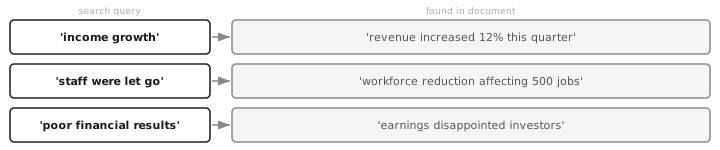
Results:
| Query | FTS5 | Semantic |
|---|---|---|
| “income growth” | miss | MATCH (rank 1) |
| “staff were let go” | miss | MATCH (rank 1) |
| “poor financial results” | miss | MATCH (rank 1) |
FTS5 misses all three. It applies Porter stemming and matches on token roots — “income” and “growth” share no stems with “revenue increased,” so it finds nothing. Semantic search embeds both the query and the page text into the same 384-dimensional vector space, and “income growth” lands close to “revenue increased”: close enough to rank at the top.
This is the use case semantic search was built for. When an agent asks a question in plain English about a document written by a finance team, the vocabulary gap is real and FTS5 cannot bridge it.
Section 2: Where Keyword Search Wins
I built five-page PDFs with identical filler on every page except one, which contains a unique identifier. Then I searched for the exact identifier.
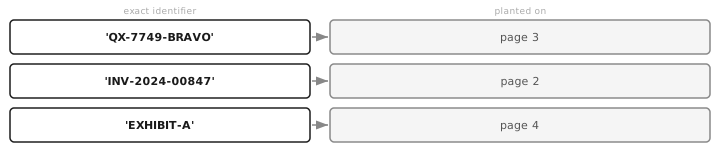
Results:
| Query | FTS5 rank 1 | Semantic rank 1 |
|---|---|---|
QX-7749-BRAVO |
page 3 (deterministic) | page 3 |
INV-2024-00847 |
page 2 (deterministic) | page 2 |
EXHIBIT-A |
page 4 (deterministic) | page 4 |
Both tools found the right page. So why is this a FTS5 win?
Because semantic also finding the right page is the trap.
You run it once, it works. So you think you are fine. But similarity-based retrieval is probabilistic. The embedding model has never seen QX-7749-BRAVO during training. It treats the identifier as noise and ranks pages by whatever other signals push the similarity score. In this benchmark, the filler pages were identical, so the planted page wins by elimination. In a real document, where pages have varied content that might incidentally score higher, the identifier page may not rank first.
FTS5 either finds QX-7749-BRAVO or it does not. That determinism is the feature. When your agent needs to retrieve a specific invoice, “probably the right page” is not an acceptable answer.
Section 3: Performance
I built a 200-page PDF and measured cold-start and warm-query latency for both tools.
| Cold start | Warm query | |
|---|---|---|
| FTS5 | 139ms | 0.7ms |
| Semantic | 291ms | 3.2ms |
The cold-start gap (139ms vs 291ms) comes from embedding generation. The first time you call pdf_semantic_search on a PDF, it embeds every page and stores the results in SQLite as float32 BLOBs. That is a one-time cost, cached by file mtime. Subsequent queries load the vectors from SQLite and run cosine similarity in numpy, which on a 200-page PDF takes less than a millisecond.
After warm cache, both tools are fast enough for any agent use case. FTS5 at 0.7ms, semantic at 3.2ms. Neither is a bottleneck.
The practical implication: do not let cold-start cost drive tool selection. Run pdf_semantic_search once on a document you will query repeatedly and the embedding cost disappears.
The Dual-Search Pattern
The benchmark makes the routing rule clear.
The Dual-Search Pattern: choose search mode based on query type, not on a preference for one technology.
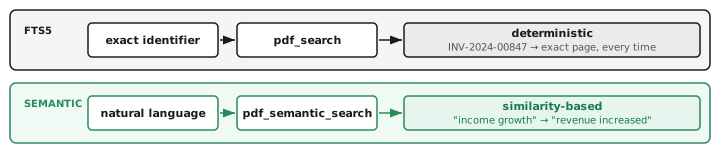
In practice, you can implement this routing with a simple heuristic:
import re

def choose_search(query: str) -> str:
    # Alphanumeric codes, version strings, document references
    if re.search(r"[A-Z0-9\-]{4,}", query):
        return "fts5"
    return "semantic"
This is not a perfect classifier, but it is the right starting point. Most agent queries either contain structured identifiers or they do not. For ambiguous cases, run both and merge results: the hybrid approach that enterprise search tools implement at infrastructure cost, here achievable in SQLite alone.
This is also why agents fail silently. They pick the wrong retrieval tool and return plausible but incorrect results. The model is not hallucinating. It is faithfully reporting what the retrieval layer gave it. The problem is upstream, in tool selection.
Implementation: SQLite Only, No External Infrastructure
Most hybrid search articles reach for Elasticsearch or a hosted vector database. pdf-mcp implements both retrieval modes in a single SQLite database:
page_texttable: regular SQLite rows, stores raw text per pagepdf_search_ftstable: FTS5 virtual table mirroringpage_text, indexed at first accesspage_embeddingstable: rawfloat32BLOBs, 1,536 bytes per page at 384 dimensions
The embedding model (BAAI/bge-small-en-v1.5) runs locally via fastembed and ONNX Runtime. No PyTorch, no GPU required. Install footprint: ~35MB wheels + 67MB model download on first use.
pip install 'pdf-mcp[semantic]'
If fastembed is not installed, pdf_search works without it. The tools are independent; adding semantic search does not touch the FTS5 implementation.
This matters for MCP server design specifically. An MCP server runs as a short-lived subprocess per conversation. It cannot assume a running database server or cloud API. SQLite with cached embeddings is the right architecture: it starts in milliseconds, persists between invocations, and adds no operational overhead.
For agents processing PDFs, such as contract review, document Q&A, and research pipelines, this pattern scales to thousands of pages without external infrastructure.
The Search Problem Is Actually Two Problems
When people say “AI agents need better search,” they usually mean two different things:
- The agent asks a question in natural language and the document answers it in different words
- The agent needs to retrieve a specific fact, reference, or identifier reliably
Semantic search solves problem 1. Keyword search solves problem 2. The mistake is treating them as the same problem.
In production document processing, both appear constantly. A contract review agent needs to find “indemnification clause” by meaning AND retrieve “EXHIBIT-A” by exact match. A financial analysis agent needs to understand that “revenue growth” and “sales increase” are related AND pull QX-7749-BRAVO precisely from an inventory report.
Neither tool replaces the other. The pattern is routing: recognizing which problem you have before choosing which tool to use.





Discussion
Comments are powered by GitHub Discussions. Sign in with GitHub to join the conversation.