“Lambda or Fargate?” I’ve been asked this question dozens of times. And for years, my answer was the classic consultant cop-out: “It depends.” But that’s not actually helpful when you’re staring at a new project and need to make a call.
So I built a simple framework. Five questions, clear outcomes. It won’t cover every edge case, but it’ll get you to the right answer 80% of the time.

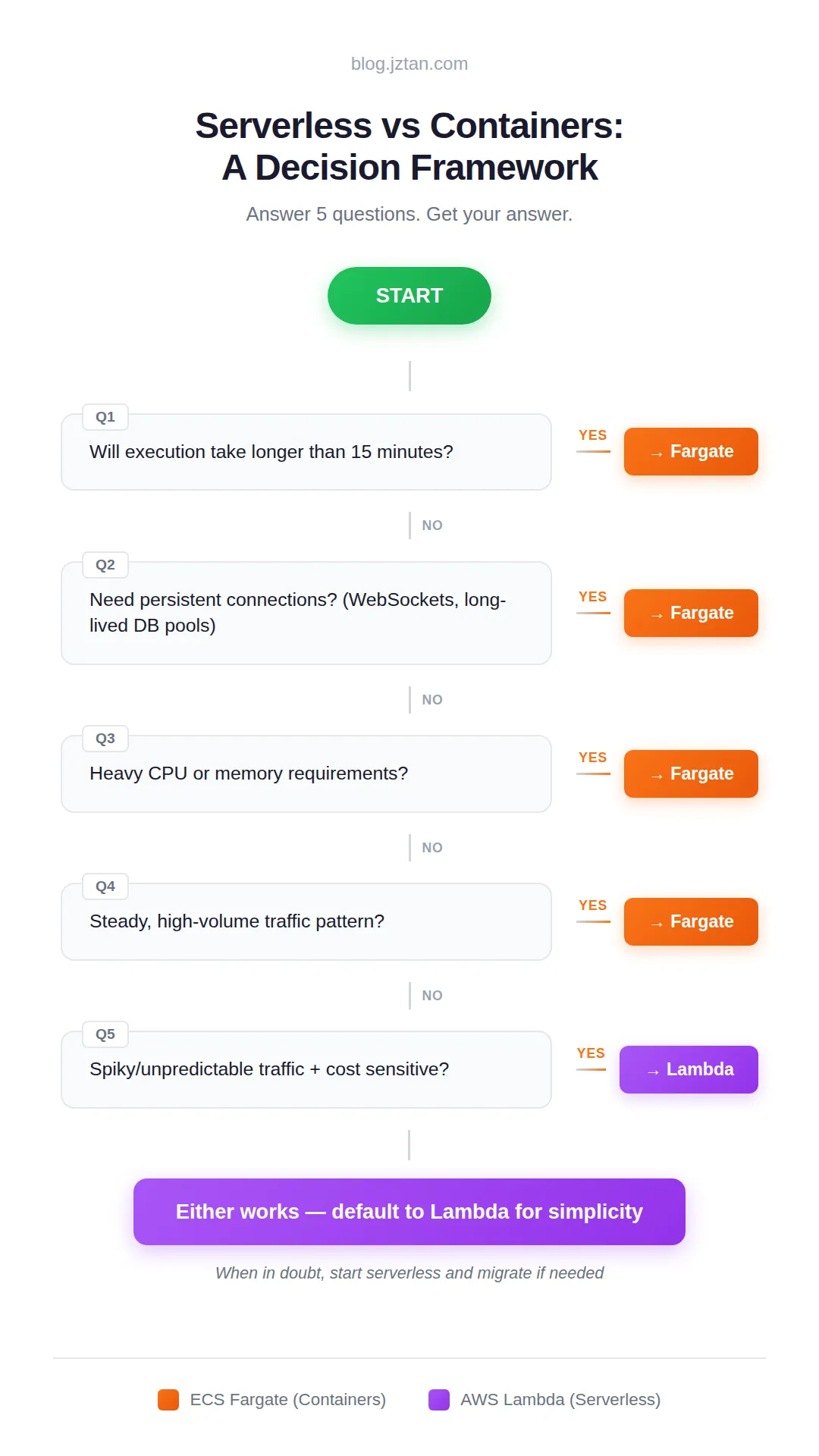
TL;DR: Five questions decide between Lambda and Fargate. Four push toward Fargate: execution time over 15 minutes, persistent connections, heavy CPU/memory, or steady high-volume traffic. One pushes toward Lambda: spiky, cost-sensitive workloads. If none apply, start with Lambda and migrate if the data tells you to.
Why This Framework Exists
After years of building on AWS, I keep seeing the same two mistakes:
Defaulting to containers because “that’s what we know.” Teams spin up ECS clusters for workloads that would’ve been simpler, cheaper, and easier to maintain on Lambda. They end up managing infrastructure instead of shipping features.
Going serverless when the architecture doesn’t fit. Lambda’s request/response model breaks down when you need persistent connections, long-running processes, or heavy compute. Teams hit walls and end up rewriting.
This framework forces you to confront the actual constraints before you commit.
Q1: Will execution take longer than 15 minutes?
YES → Fargate
This is the hardest limit. Lambda functions max out at 15 minutes, and there’s no workaround: no configuration change, no support ticket, nothing. If your workload might exceed that, the decision is already made.
This catches more teams than you’d expect. Batch processing jobs, ML inference pipelines, video transcoding, large file processing: these routinely push past 15 minutes. And it’s not just about average runtime. If your function typically finishes in 10 minutes but occasionally hits 20 under load, you’ve got a problem.
My rule: if you’re consistently running above 10 minutes, go Fargate. Give yourself headroom. Lambda’s timeout isn’t a graceful degradation. It’s a hard kill. Your function just dies, mid-execution, no cleanup.
Q2: Need persistent connections?
YES → Fargate
Lambda’s execution model is request-in, response-out. Each invocation is isolated. That works great for HTTP APIs and event processing, but it falls apart when you need connections that stay open.
WebSockets are the obvious case: Lambda can’t hold a socket open waiting for messages. But the less obvious one is database connection pooling. Lambda spins up new instances under load, each opening its own connection. Hit a traffic spike and you can exhaust your database’s connection limit fast. There are workarounds (RDS Proxy, connection pooling layers), but they add complexity and cost.
I ran into this recently when deploying Claude Code behind an API. The architecture needed persistent authentication sessions that survived across requests. Lambda couldn’t maintain that state. Each invocation was a fresh start. Fargate was the only option that let me keep long-lived processes running.
If your workload involves streaming responses, long-polling, WebSockets, or any “stay connected and wait” pattern, don’t fight Lambda’s model. Use Fargate.
Q3: Heavy CPU or memory requirements?
YES → Fargate
Lambda’s resource ceiling is 10GB of RAM and 6 vCPUs. That sounds like a lot until you’re running compute-intensive workloads. Fargate goes up to 120GB RAM and 16 vCPUs, a different league entirely.
But it’s not just about the max limits. Lambda allocates CPU proportionally to memory. If you configure 1GB of RAM, you get a fraction of a vCPU. To get meaningful compute power, you have to over-provision memory, which means paying for RAM you don’t need just to get the CPU you do.
This is what pushed me to Fargate on a recent project. The workload was CPU-bound with heavy I/O. Lambda could technically run it, but execution was slow and costs were creeping up. Moving to Fargate with dedicated compute cut processing time by over 50% and made costs more predictable.
If you’re doing image processing, video encoding, data transformation at scale, or anything that pegs the CPU, Fargate gives you the headroom and control that Lambda can’t.
Q4: Steady, high-volume traffic?
YES → Fargate
Lambda pricing is simple: you pay for every invocation plus execution time. At low to moderate volume, this is a great deal. At high, sustained volume, it starts to hurt.
Fargate pricing is different: you pay for running containers regardless of whether they’re handling requests. That sounds worse, but at consistent high volume, you’re getting more compute per dollar. The crossover point varies depending on your workload, but as a rough rule of thumb: if you’re exceeding 1M invocations/month at consistent concurrency, start comparing costs. If you’re running Lambda functions 24/7 at high concurrency, it’s almost certainly worth switching.
There’s also a performance angle. Lambda has cold starts. For occasional traffic, this is negligible. For sustained load, you’re either paying for provisioned concurrency (which erodes the cost advantage) or accepting latency spikes. Fargate containers stay warm, delivering consistent response times without extra configuration.
If your traffic is predictable and steady, Fargate’s fixed-cost model often wins. If you’re not sure, start with Lambda and watch your bills. The data will tell you when to switch.
Q5: Spiky/unpredictable traffic + cost sensitive?
YES → Lambda
This is where Lambda shines. Scale to zero means you pay nothing when idle. No traffic at 3am? No cost. Sudden spike because you hit the front page? Lambda scales up in seconds without any capacity planning.
For event-driven workloads (processing S3 uploads, handling webhook callbacks, running scheduled jobs), Lambda is almost always the right choice. You’re not paying for compute sitting idle waiting for work to arrive.
The same goes for APIs with variable traffic patterns. Early-stage products, internal tools, anything where usage is unpredictable. Lambda lets you defer capacity planning until you have real data. You might never need to plan at all.
If none of the previous questions pushed you toward Fargate, start with Lambda. It’s less to manage, less to configure, and less to pay for while you figure out what your workload actually needs. You can always migrate later if you hit the limits. Going the other direction (containers to serverless) is usually a harder refactor.
Quick Reference
| Factor | Lambda | Fargate |
|---|---|---|
| Execution time | ≤15 min | Unlimited |
| Persistent connections | ❌ | ✅ |
| Max memory | 10GB | 120GB |
| Max CPU | 6 vCPUs | 16 vCPUs |
| Traffic pattern | Spiky/variable | Steady/high-volume |
| Scale to zero | ✅ | ❌ |
| Cold starts | Yes | No |
| Operational overhead | Low | Medium |
The Bottom Line
This framework won’t cover every edge case. Team expertise matters. Existing infrastructure matters. Sometimes the “wrong” choice is right for your context.
If you’re making this decision as part of a larger migration, The 7 Rs of Cloud Migration covers the broader framework that shapes compute choices.
And remember: it’s not always either/or. Many production architectures use both: Lambda for API endpoints and event processing, Fargate for background jobs and long-running services. Use the right tool for each part of your system.
But for most decisions, these five questions will get you there. When in doubt: start serverless, measure what actually happens, and migrate if the data tells you to. Over-engineering on day one costs more than a refactor later.
If you go with Lambda, two posts worth reading next: Parallel Processing in AWS Lambda with Python (what actually works for CPU-bound workloads) and AWS Lambda Cost Optimization (practical tips that cut our bill).
The Cheat Sheet
Save this for your next architecture decision.





Discussion
Comments are powered by GitHub Discussions. Sign in with GitHub to join the conversation.