
Your AI agent tries to read a Medium article. Cloudflare returns 403. The agent silently fabricates an answer from search snippets and never tells you. On the pages it can reach, it burns 80,000 tokens parsing ad-tech and cookie banners to find one paragraph of prose. Two open-source Python libraries fix both problems in about 40 lines of code: curl_cffi gets through the CDN, and trafilatura strips the page down to the article itself.
I run BlueClaw, an open-source AI agent runtime with structured execution tracing, so I had per-call records of exactly which fetches failed, where the tokens went, and what each turn cost. The code change turned out to be tiny. The reasoning behind it is what made the broader token-cost picture for an agent runtime finally make sense.
TL;DR: Cloudflare blocks Python’s default TLS fingerprint, and raw HTML burns 80k tokens to deliver 2k of prose. Use
curl_cffito impersonate Chrome’s handshake, then run the response throughtrafilaturato keep only the article body. You skip the headless browser and the API key, and cut the token count by about 90%.
The common failure pattern
Most AI agent web tools are wired up like this:
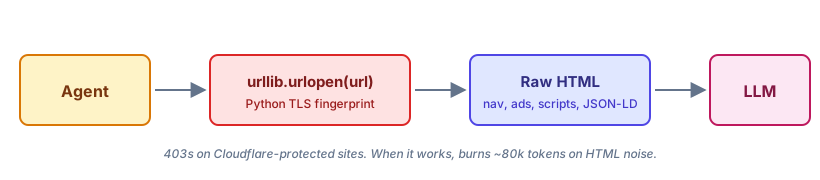
This works on Wikipedia, on docs.python.org, and on anything else that does not run behind a modern CDN.
It fails on Medium, on Substack, and on most news sites, and the failure is not always loud. Sometimes you get a 403. Sometimes you get a Cloudflare interstitial that the LLM cheerfully summarizes as “the page asks you to verify you are human.” Anthropic’s own Claude Code tracks this as issue #39896: WebFetch fails because Cloudflare’s bot protection blocks the headless verification request. The Cloudflare community forum has version after version of the same complaint: “Claude can’t fetch my site, returns 403.”
Worse, Claude Code issue #45070 documents the silent variant: the agent fabricates an answer from search snippets when WebFetch fails, instead of reporting the failure. The model never registers the failure, so neither do you, and the wrong answer ships. This is the failure mode I argued for handling explicitly in AI agent error handling patterns. A tool that fails silently is worse than one that fails loudly.
The naive pipeline has a second problem even when it works. A typical news article’s HTML carries about 6% semantic content by byte count. You are paying premium API rates to tokenize navigation menus, ad slots, GDPR banners, and inline tracking scripts so the model can find one paragraph.
The fetch-extract pattern
Fetch and extract are two different problems, and they need two different libraries, both at browser grade.
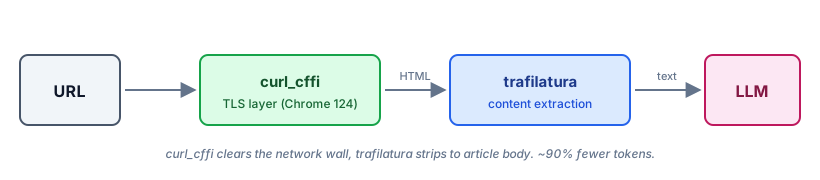
The network layer’s job is to look like a real browser to the server. The content layer’s job is to look like a real reader to the model.
Each library is specialized for its layer, and stacking them gives you something neither does alone.
The typical alternatives each miss one of those layers. A hosted scraping API (Scrapfly, ZenRows, Bright Data) solves the network layer and ignores the content layer. A library like readability-lxml solves the content layer but does nothing for the 403. An HTML-to-markdown converter cuts tokens 80% but still ships 16,000 of them when 3,000 would do. The fetch-extract pattern gives you both layers, locally, with no API key.
Why urllib fails on Cloudflare
The default Python HTTP stack is honest about being Python. When urllib or requests opens a TLS connection, the resulting TLS and HTTP/2 fingerprint looks nothing like Chrome’s. Modern bot detection fingerprints all of it. There is no User-Agent header gymnastics that fixes it, because the fingerprint is in the bytes of the handshake itself, before any header is sent.
The fix is curl_cffi. It is curl compiled against Chrome’s BoringSSL library, exposed as a Python module, configured to closely emulate Chrome 124’s TLS fingerprint. From the server’s point of view, the connection looks like a real browser at the network layer.
from curl_cffi import requests

resp = requests.get(url, impersonate="chrome124", timeout=30)
resp.raise_for_status()
html = resp.text
Three things to notice. First, the API is the same as requests, so you swap one import. Second, the impersonation target is explicit: you pick a browser version, and curl_cffi ships the matching handshake. (Browsers ship new TLS profiles every few months, so pin a recent version, or use the unversioned impersonate="chrome" target, which auto-tracks the latest profile curl_cffi ships.) Third, this is not a headless browser. It installs no Chromium binary and no Playwright dependency, and it runs no JavaScript engine, so the process stays small, fast, and stateless. That matters when your agent runs the tool five times per turn.
What curl_cffi cannot do: solve a JavaScript challenge. Cloudflare Turnstile, hCaptcha, or any other JS-based challenge stops here. For those you need a real browser. But JavaScript challenges are a small minority of what blocks AI agents. Many “Cloudflare 403” failures against AI agents turn out to be TLS fingerprint rejections, which is exactly what curl_cffi exists to defeat.
Why HTML costs 10x more than the article
You can have the HTML. You still cannot afford to read it.
Cloudflare ran the numbers themselves when they shipped Markdown for Agents earlier this year: a blog post that requires 16,180 tokens in HTML shrinks to about 3,150 tokens as Markdown. That is a 5x reduction from format conversion alone.
I see the same shape in BlueClaw’s traces. A typical article fetched with urllib.urlopen lands anywhere from 25,000 to 150,000 tokens once you tokenize the response body, depending on how much chrome, JSON-in-script payload, and embedded media the page ships. The same article, fetched and then run through trafilatura’s extract, typically lands at a few hundred to ~10,000 tokens. The reduction is not from compression. It is from throwing away everything that was never going to be useful to the model: nav links, sidebar ads, cookie banners, recommendation widgets, inline SVG icons, JSON-LD blobs, and the GDPR modal markup.
Why does this matter for an agent specifically? Because agents loop. A chatbot reads one page per turn. An agent reads three pages, decides to refine its query, reads five more pages, then summarizes. The HTML cost compounds at every step. By the time the agent answers, the same bloated page has been re-injected into context six or seven times. It is also why, for structured sources, agents should prefer APIs over search. For the long tail of articles where no API exists, fetch-extract is the floor.
It also matters for local models. A 14B local model running through Ollama has a 32k context window if you are lucky. An 80k-token raw HTML response simply does not fit. The model never sees the article. With trafilatura, the same article fits in the prompt with room left over for the question, the tool history, and the answer.
The content layer: trafilatura
There is a small graveyard of article-extraction libraries in Python. newspaper3k was the most popular for years and has not shipped a release since 2018. readability-lxml, the Mozilla Readability port, is well maintained and works fine on well-formed HTML but breaks on aggressive layouts. boilerpipe is a Java port that nobody wants to depend on.
Trafilatura is the one that has held up. The SIGIR 2023 benchmark combining eight evaluation datasets scored it as the best single open-source extractor at 0.883 mean F1, ahead of Readability and Resiliparse. Only multi-tool ensembles ranked higher, and they pay for it in dependency weight. It is pure Python, has no browser dependency, and ships with a useful escape hatch: if its primary extractor returns suspiciously short output, it falls back to readability-lxml automatically and combines the two strategies. You get the best of both without writing the fallback yourself.
The API surface that matters is two functions:
import trafilatura

text = trafilatura.extract(
    html,
    include_comments=False,
    include_tables=False,
)
That is the whole interface. Your application code never touches a CSS selector, a site-specific rule, or the DOM. Trafilatura’s heuristics handle Medium, Substack, the New York Times, IEEE Spectrum, Hacker News, and most personal blogs without configuration. When it does not handle a site well, you get back a shorter extraction or None rather than a crash or a 30-second hang.
Putting it together
Here is the fetch-extract pattern as a standalone function. BlueClaw’s actual http_request tool wraps this in a factory with a domain allowlist and a few extraction tweaks (title prepending, favor_recall=True), but the bones are the same:
from curl_cffi import requests
import trafilatura

def http_request(url: str, extract_main: bool = True) -> str:
    """Fetch a URL with Chrome TLS impersonation.

    Optionally runs trafilatura on HTML responses.
    """
    resp = requests.get(
        url,
        impersonate="chrome124",
        timeout=30,
        allow_redirects=True,
    )
    resp.raise_for_status()

    html = resp.text

    # Skip extraction on non-HTML (JSON, text, etc).
    content_type = resp.headers.get("content-type", "").lower()
    is_html = "text/html" in content_type
    if not (extract_main and is_html):
        return html

    extracted = trafilatura.extract(
        html,
        include_comments=False,
        include_tables=False,
    )
    # Fall back to raw HTML if extraction returned nothing.
    return extracted or html
A few notes on that code.
The impersonate="chrome124" parameter is the entire Cloudflare bypass. You do not configure a proxy, rotate User-Agent strings, or rewrite headers. You picked a browser version and curl_cffi shipped its handshake.
The content-type check matters. If your agent calls the tool against a JSON API or a plaintext robots.txt, you do not want trafilatura mangling it. Run extraction only when the server sent HTML.
Treat extract_main as a config knob, not a per-call argument the agent decides at runtime. In BlueClaw, for example, it lives in blueclaw.yaml as http_extract_main and is closed over at tool-registration time, so the agent never sees the toggle. Your config does.
Falling back to raw HTML means extraction failures degrade gracefully instead of silently dropping content. If extraction fails, the model still gets the page, just at the higher token cost, which beats getting nothing at all.
Dependencies: curl-cffi>=0.7, trafilatura>=1.12. Wheels exist for every platform that matters.
What the numbers look like in a trace
The reason I trust the 90% number is that BlueClaw writes a structured JSON trace for every run, including before-and-after token counts on every tool call. After turning on http_extract_main, the same fetch through the fetch-extract pipeline looks like this:
Single fresh fetch per URL on 2026-05-19, via curl_cffi.requests.get(impersonate="chrome124"). Tokens counted with tiktoken cl100k_base. Extraction uses trafilatura.extract(include_tables=True, favor_recall=True) with the metadata title prepended. The script and raw JSON live in the companion repo.
| Site | Raw HTML tokens | After trafilatura | Reduction |
|---|---|---|---|
| Medium long-read | 28,506 | 339 | 98.8% |
| Substack long-form (ACX) | 63,722 | 8,358 | 86.9% |
| IEEE Spectrum feature | 147,706 | 4,134 | 97.2% |
| Indie blog (text-heavy) | 22,525 | 9,000 | 60.0% |
| NYT article | n/a | n/a | HTTP 403 |
NYT still 403s even with chrome124 impersonation. That is not a TLS-only block, and the escalation path is below.
The shape is consistent: the more aggressively designed the page, the more dramatic the reduction. IEEE Spectrum ships an enormous DOM (148k tokens) because every figure caption, share widget, and recommended-article block lands in the HTML; trafilatura keeps only the body. A clean indie blog gets a smaller cut (60%) because there was less noise to throw away to begin with. Substack falls in the middle: long article body, real reader chrome.
The dollar number that matters is the Sonnet input rate at $3 per million tokens. A single 80,000-token fetch costs $0.24 just to read the input. The same fetch through the fetch-extract pattern costs $0.01 to $0.02. An agent that fetches five pages per turn over a 20-turn session swings from $24 to about $1.50 on web reading alone. That gap is what decides whether you can leave an agent running unattended or have to watch the bill.
What this pattern does not fix
Cloudflare Turnstile and other JavaScript challenges still stop curl_cffi. If a site you need throws a JS challenge, you have to escalate to a real browser. The conventional escalation path is to pair curl_cffi with nodriver or Playwright: solve the challenge once in a headless browser, extract the cf_clearance cookie, then hand the cookie to curl_cffi for subsequent requests. This is real engineering, not a one-liner, and most agent use cases never need it.
Aggressive single-page applications still defeat trafilatura. If a site renders its content client-side from a JSON API, the HTML you receive has nothing to extract. The fix here is to call the JSON API directly when one exists, or to render the page in a real browser when one does not. For SPAs the fetch-extract pattern degrades to “fetch only,” and your tokens go back up.
Neither limit kills the pattern. The large majority of sites block Python’s default TLS but still render real HTML, and that is the case fetch-extract is built for. It covers Medium, Substack, GitHub, Stack Overflow’s blog, most news sites, and most documentation sites that hide behind Cloudflare.
Wiring it into your stack
The pattern is framework-agnostic. Whatever your stack calls its web tool, the swap happens behind the interface the model sees: replace the fetcher inside your LangChain WebBaseLoader, the fetch_url function behind your OpenAI function calls, or the http_request tool in your own registry with the function above. The one stack that needs more than a body swap is Claude Code, because the built-in WebFetch has the architectural Cloudflare issue tracked in #39896. The cleanest path there is a fetch MCP server that calls this code; several community servers already wrap curl_cffi and trafilatura together.
What I watch in traces
Once the pattern is in production, three per-domain trace signals tell you when it degrades. Tokens saved per call: a domain that suddenly stops saving tokens has changed its layout or moved rendering to the client, and you are silently falling back to raw HTML. Time to fetch: impersonation plus extraction adds overhead, consistently under 400ms on Medium-class pages in BlueClaw’s traces; if it climbs, look for oversized pages blowing past trafilatura’s default time budget. 403 rate: after turning on impersonation, mine dropped to under 2% across thousands of fetches, so a 403 today almost always means a JavaScript challenge or a real ban, not a fingerprint problem. For the broader picture of which signals to wire up, see monitoring AI agents in production and the leaner observability-without-a-dashboard setup BlueClaw uses today.
The whole change
Two pure-Python libraries, each doing one thing: curl_cffi impersonates Chrome at the network layer, trafilatura reads the article at the content layer. That replaces a hosted bypass API, a headless browser, and per-site selectors. Wire them into your agent’s existing web tool and the interface the model sees does not change.
The payoff is a token bill that stops climbing on every page the agent reads, and a fetch tool that reports failure instead of inventing an answer around it. Two imports, one impersonation flag, one function call. After that it disappears into a trace you stop looking at.
The curl_cffi + trafilatura web fetcher ships in BlueClaw as part of the http_request tool. The implementation lives in the open-source repo.