
To deploy a Python MCP server remotely, you make four moves: switch the transport from STDIO to HTTP, put an auth gate in front of it, package it in a Docker container, and run it behind a reverse proxy that handles TLS. The server code barely changes. Everything hard about this is the layers you wrap around it.
This is Part 2. In Part 1, we built an MCP server in Python with FastMCP 4: tools, resources, prompts, SQLite persistence, and tests, all running locally as a subprocess of Claude Desktop. That server works beautifully on your laptop. It cannot be reached by anything that isn’t on your laptop.
I maintain pdf-mcp and redmine-mcp-server, two open-source MCP servers that run both as local STDIO processes and as remote HTTP services. The jump from “runs on my machine” to “runs somewhere other agents can use it” is where the interesting failures live, and almost none of them are in the tool code.
TL;DR: A remote MCP server needs four layers: Transport (STDIO becomes HTTP, a one-line change), Gate (a bearer token so not just anyone can call your tools), Box (a Docker image so it runs the same everywhere), and Edge (a reverse proxy terminating TLS). FastMCP gives you the first two almost for free. The last two are standard deployment, not MCP-specific. We’ll take the notes server from Part 1 through all four.
The mental model worth keeping: Transport, Gate, Box, Edge. Every remote MCP server is those four layers, and you can reason about each one independently.
1. Why STDIO can’t go remote
In Part 1, the server ran with mcp.run(), which defaults to STDIO transport. STDIO means the client spawns your server as a subprocess and talks to it over stdin and stdout. That is a local-only contract by definition: there is no subprocess across a network.
This is also why, in Part 1, a stray print() corrupted the message stream. Over STDIO, stdout is the protocol channel.
To serve a remote client, you need a transport that listens on a network port. FastMCP supports Streamable HTTP, the transport the MCP specification now recommends for remote servers (the older HTTP+SSE transport is deprecated). The client connects to a URL instead of spawning a process.
Nothing about your tools, resources, or prompts changes. Only how messages arrive.
2. Transport: switch to HTTP
Here is the entire transport change. In the __main__ block from Part 1, swap the run call:
import asyncio

if __name__ == "__main__":
    asyncio.run(init_db())
    mcp.run(transport="http", host="0.0.0.0", port=8000)
That is it. Your server now listens on port 8000 and exposes the MCP endpoint at http://localhost:8000/mcp. Bind to 0.0.0.0 (not 127.0.0.1) so the process is reachable from outside its own container later.
For local development, mcp.run(...) is fine. For anything you actually deploy, FastMCP gives you an ASGI application instead, which you run with a real server like Uvicorn:
app = mcp.http_app()
uvicorn server:app --host 0.0.0.0 --port 8000
This ASGI route is the one to reach for when you scale horizontally: a process manager like Uvicorn or Gunicorn handles concurrency, graceful shutdown, and workers properly. One catch worth knowing: startup state like your database has to be initialized in the app’s lifespan, because a __main__ block never runs under Uvicorn. The companion repo wires init_db() into the lifespan so this path works out of the box. For everything below, we’ll stick with the simpler mcp.run() path. The endpoint stays at /mcp unless you pass a path argument, which is handy when you host several MCP servers behind one domain.
One thing to decide early: stateless mode. By default, FastMCP keeps session context in memory on the instance that handled the first request. The moment you run more than one instance behind a load balancer, that breaks, because the next request can land on a different instance. If you plan to scale horizontally, go stateless from the start:
app = mcp.http_app(stateless_http=True)
I only learned to set this on day one after watching a multi-instance deploy fail intermittently in a way that looked exactly like a flaky tool. It was not the tool; it was session affinity.
FastMCP 4 softens this over time rather than removing it. The 2026-07-28 protocol drops server-side sessions entirely, and FastMCP negotiates per connection, so a client on the new protocol needs no affinity at all. Sessions still exist for handshake-era clients, which is most of what is installed today, so set stateless_http=True anyway until your callers have moved.
3. Gate: add bearer-token auth
A server on a public port with no auth is an open door: an API anyone on the internet can call. For the notes server that means anyone can read, write, and delete notes. For a server wired to a real API, it means anyone can do whatever that API allows.
FastMCP has authentication built in. The simplest working gate is a static bearer token. The client sends Authorization: Bearer <token>, and the server rejects anything else:
from fastmcp import FastMCP
from fastmcp.server.auth.providers.jwt import StaticTokenVerifier

verifier = StaticTokenVerifier(
    tokens={
        "your-secret-token": {
            "client_id": "primary",
            "scopes": ["notes:use"],
        }
    },
    required_scopes=["notes:use"],
)

mcp = FastMCP(name="Notes", auth=verifier)
The token string identifies the caller; the scopes decide what that caller is allowed to do. Authentication and authorization are two different gates, and that tokens dict configures both.
Never hardcode the token. Read it from the environment so it lives in your deploy config, not your source:
import os
from fastmcp.server.auth.providers.jwt import StaticTokenVerifier

token = os.environ["MCP_TOKEN"]

verifier = StaticTokenVerifier(
    tokens={token: {"client_id": "primary", "scopes": ["notes:use"]}},
    required_scopes=["notes:use"],
)

mcp = FastMCP(name="Notes", auth=verifier)
Be honest about what this is. StaticTokenVerifier stores tokens in plaintext, and FastMCP’s own documentation says it should never be used in production. It is a real gate, good enough for a single-user server you reach over a VPN or a private network, or for internal tooling. It is not good enough for a multi-tenant service exposed to the open internet.
When you outgrow it, FastMCP gives you the upgrade path without rewriting your tools:
JWTVerifier(jwks_uri=...)validates signed JWTs against a public key set, the right move when an identity provider issues your tokens.JWTVerifier(public_key=..., algorithm="HS256")validates tokens signed with a shared secret.- Full OAuth 2.1, now the standard the MCP spec mandates for public HTTP servers, when you need third parties to authorize against your server.
The point is that auth is a swap of one object, not a redesign. Start with the gate you can ship today, and know exactly what triggers the upgrade. (Picking the wrong default here is one of the 8 security holes I found auditing my own MCP server.)
One caveat for the long run: FastMCP’s exact auth classes have moved between releases, so treat the names here as current-as-of-writing rather than permanent. The principle does not change: put a bearer-token verifier in front of the server and validate the required scopes. If an import breaks on a future version, that is what you are re-wiring.
4. Box: containerize it
A container makes “works on my machine” mean “works on every machine.” It pins the Python version, the dependencies, and the start command into one artifact.
Here is the minimal Dockerfile, a slightly more honest version of the one Part 1 hinted at:
FROM python:3.12-slim

WORKDIR /app
COPY server.py .
RUN pip install --no-cache-dir \
    "fastmcp>=4.0.3,<4.1" aiosqlite uvicorn

EXPOSE 8000
CMD ["python", "server.py"]
Running python server.py initializes the database, then starts the HTTP transport. (To scale across multiple workers, swap the command for uvicorn server:app and use the lifespan-wired app from the companion repo.)
Build it:
docker build -t notes-mcp .
Run it, passing the token in as an environment variable so the secret never enters the image:
docker run -d -p 8000:8000 -e MCP_TOKEN="your-secret-token" --name notes-mcp notes-mcp
Two rules that save you later:
- Secrets go in
-eflags or Docker secrets, never in the Dockerfile. Anything in the image is readable by anyone who pulls it. - SQLite lives inside the container, so it dies with the container. For the notes server that is fine for a demo. For real data, mount a volume (
-v notes-data:/app) or move to a managed database. A disposable container with a non-disposable database is the usual production shape.
5. Edge: put HTTPS in front
Here is the deliberate choice in this guide: no specific platform. Once your server is a container that listens on a port and reads its secret from the environment, every host runs it the same way. A VPS with Docker, a managed container service, a PaaS, a Kubernetes cluster: they all want the same three things.
The platform-neutral deploy checklist:
- Run the container and expose its port internally.
- Inject the secret (
MCP_TOKEN) through the platform’s environment or secrets manager. - Put a reverse proxy in front that terminates TLS, so clients connect over HTTPS while your server speaks plain HTTP internally.
That third step is the one most hobby deployments skip, and the one that causes the most avoidable production problems. Run FastMCP on plain HTTP inside your network and let the proxy handle certificates. A minimal nginx server block:
server {
    listen 443 ssl;
    server_name notes.example.com;

    # ssl_certificate / ssl_certificate_key configured here

    location /mcp {
        proxy_pass http://127.0.0.1:8000;
        proxy_http_version 1.1;
        proxy_set_header Host $host;
        proxy_set_header X-Forwarded-For $proxy_add_x_forwarded_for;
        proxy_set_header X-Forwarded-Proto $scheme;

        proxy_buffering off;
        proxy_read_timeout 300s;
    }
}
The two non-obvious lines are proxy_buffering off and proxy_read_timeout 300s. Streamable HTTP keeps connections open to push events; default proxy buffering holds those events back, and the default read timeout kills long-lived streams. Get these wrong and the server looks healthy while clients hang. I only found this the hard way, watching a deploy that passed every health check and still never delivered a streamed response.
Your server is now reachable at https://notes.example.com/mcp, on whatever host you like.
6. Edge gate: when you can’t touch the server
Everything so far assumed you wrote the server, so the bearer token in the Gate step lived inside it. The more common situation at work is the inverse. IT gets handed someone else’s repo, redmine-mcp-server in my case, and is told to make it reachable by the company assistant. Editing the server’s code is not on the table. This is infrastructure work, not server work, and the Gate step as written does not apply.
The server’s own inbound auth does not fit either, because it is binary. Run it in legacy mode and there is no inbound auth at all, which is the open-door problem from the Gate step, still unsolved. Run it in OAuth mode and it does full token introspection, which rejects a pasted static token outright. The client here is a company chat assistant whose plugin can only attach a static header. It cannot run an OAuth handshake. Neither native mode matches what the client is able to send.
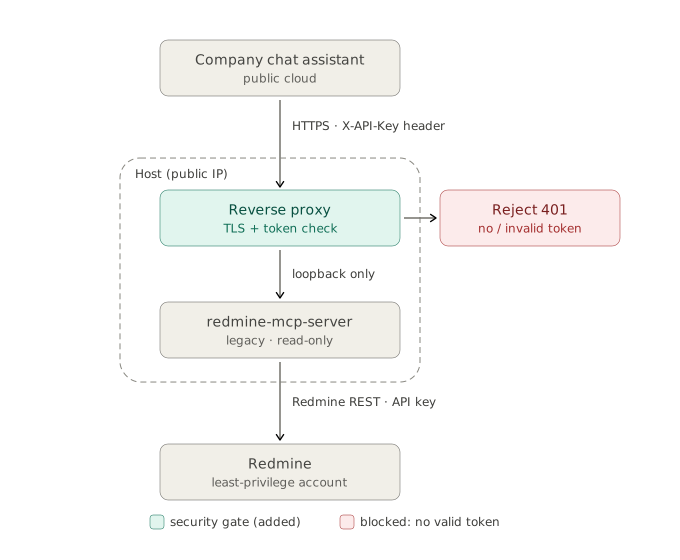
So move the gate to the edge. The reverse proxy from the Edge step already terminates TLS; give it one more job. Validate the token, return 401 to everything else, and forward only valid requests over loopback. Normally Gate and Edge are two separate layers. Here they merge into one, because the server cannot host the gate and the proxy already exists.
The assistant’s plugin sends its token in an X-API-Key header, so that is the header the proxy checks. In nginx, a map plus a guard inside the location block does it:
map $http_x_api_key $auth_ok {
    default              0;
    "your-secret-token"  1;
}

server {
    listen 443 ssl;
    server_name redmine-mcp.example.com;

    location /mcp {
        if ($auth_ok = 0) {
            return 401;
        }
        proxy_pass http://127.0.0.1:8000;
        # plus the proxy headers from the Edge step
    }
}
Caddy expresses the same gate in three lines:
redmine-mcp.example.com {
    @noauth not header X-API-Key "your-secret-token"
    respond @noauth 401
    reverse_proxy 127.0.0.1:8000
}
The server never learns the gate exists. It receives only the requests that already passed.
Bound the blast radius with config, not code. A gate decides who gets in, not what they can do once inside. Two deployment settings, both zero-code, cap the damage a request can do even after it clears the proxy:
- Read-only mode. redmine-mcp-server reads
REDMINE_MCP_READ_ONLY=trueand blocks every write tool at the server. (I covered why that switch belongs at the server and not the prompt in how to ship an MCP server to production.) - Least-privilege upstream account. The API key the server uses to reach Redmine should belong to an account that can see only what this assistant should see. The gate stops strangers; this stops an authorized request from reaching data it has no business touching.
Here is the full shape, gate at the edge and limits in config:
Be honest about the limit. Legacy mode plus one shared API key means no per-user isolation. The plugin can forward a user id, but a legacy server ignores it, so everyone with access to the assistant sees exactly what that one shared account sees. Scope the account accordingly, and tell users the view is shared. Real per-user auth needs the server’s OAuth mode, which a static-token client cannot drive. The edge gate buys you a safe shared deployment, not individual identities.
Worked example: the plugin form. In the assistant’s plugin configuration, the field that matters is authentication. Choose the option that attaches a static token as a request header, set the header name to X-API-Key, and use the token the proxy expects. Do not choose “no auth,” which is the open door again, now one form field away. Point the plugin’s URL at the proxy hostname, never at the server’s port directly. From the assistant’s side it is a normal HTTPS tool. From yours, the proxy is doing all the work the server cannot.
The point is the one the four-layer model has been building toward: the gate does not have to live in the server. When you did not write the server, the gate is infrastructure, and the edge is where it goes.
7. Where remote MCP servers run
The mechanics above do not change with the host. Pick whatever you already know. Most remote MCP servers end up in one of four shapes, and Transport, Gate, Box, Edge holds across all of them:
| Deployment shape | Good for |
|---|---|
| Single VPS + Docker + nginx | Full control, lowest cost, one box to reason about |
| PaaS (Railway, Fly.io, Render) | Fastest path to a public URL; the platform is your edge |
| Managed containers (ECS/Fargate, Cloud Run) | AWS or GCP shops that want autoscaling without managing nodes |
| Kubernetes | Large-scale or multi-service deployments you already operate |
The only layer that moves is the Edge. On a PaaS or managed container platform, TLS is terminated for you, so you drop the nginx block and keep everything else. On a VPS you own all four layers yourself. Either way, a hosted MCP server is still just Transport, Gate, Box, and Edge.
8. Connect a remote client
A deployed server you cannot reach proves nothing. FastMCP’s Client connects to a remote URL and attaches the token:
from fastmcp import Client
from fastmcp.client.auth import BearerAuth

async def main():
    async with Client(
        "https://notes.example.com/mcp",
        auth=BearerAuth(token="your-secret-token"),
    ) as client:
        result = await client.call_tool(
            "add_note",
            {"title": "Remote test", "content": "Reached the server over HTTPS"},
        )
        print(result)
You can also pass the raw token string to auth= directly, and FastMCP adds the Bearer prefix for you. Drop the token and the same call returns a 401. That is your gate working.
To use the remote server from Claude Desktop or another MCP client, point it at the HTTPS URL and supply the Authorization header in the client’s remote-server configuration. The tools, resources, and prompts you built in Part 1 appear exactly as they did locally. The agent cannot tell the difference, which is the whole point: the same server now works for one user on a laptop and for many users across a network.
9. The production checklist
You have a hosted MCP server: secured, containerized, remotely reachable. Before you call it a production MCP server, walk the rest of the list:
| Do this | Why it matters |
|---|---|
| Keep secrets in the environment, never in the image or git | Anything baked into the image is readable by anyone who pulls it. Rotate the token if it leaks. |
| Upgrade auth past static tokens | Move to JWTVerifier or OAuth 2.1 the moment more than one trusted party needs access. |
| Go stateless past one instance | In-memory sessions break behind a load balancer; go stateless or pin session affinity. |
| Persist data outside the container | A container is disposable; your data is not. Use a mounted volume or managed database. |
| Rate-limit anything internet-facing | MCP tools often wrap expensive operations, which makes them easy targets for abuse. Cap requests at the reverse proxy or API gateway. |
| Add logging and health checks | A server you cannot observe is one you cannot trust. I broke monitoring into four layers. |
| Drive it like an agent first | Real agents trip over bugs unit tests never catch. That is how I found 17 bugs in my own server before it was public. |
| Audit it like an attacker | A public endpoint is a target. The 8 vulnerabilities I found all became reachable the instant it went remote. |
The server barely changed between Part 1 and Part 2. What changed is everything around it: Transport, Gate, Box, Edge. Writing the tools is usually the shortest part of shipping an MCP server. Operating them safely, where other people and other agents can reach them, is where most of the engineering lives.
The full notes-mcp source covers both the local build and this remote deployment.