
When I first integrated AI agents with Redmine, I used function calling. Three tools. One agent. Everything worked.
Then a second agent needed the same integration. Suddenly I was duplicating tool definitions, copying API credentials into another codebase, and maintaining two versions of the same logic. When the ticket schema changed, I had to update both.
That duplication is what pushed me to extract the tools into an MCP server. The functions didn’t change. Where they lived changed everything.
I’ve since built and open-sourced multiple MCP servers, and I still use function calling in production for agent-specific logic. They solve fundamentally different problems. This post is the decision framework I wish I’d had before I learned that the hard way.
TL;DR: Function calling embeds tools in your app code, tightly coupled to one agent. MCP runs tools on a separate server any client can connect to. Use function calling for app-specific logic with a few internal tools. Use MCP when multiple clients need the same tools, or when you need credential isolation. In practice, I use both: MCP for shared integrations, function calling for business rules.
What They Actually Are
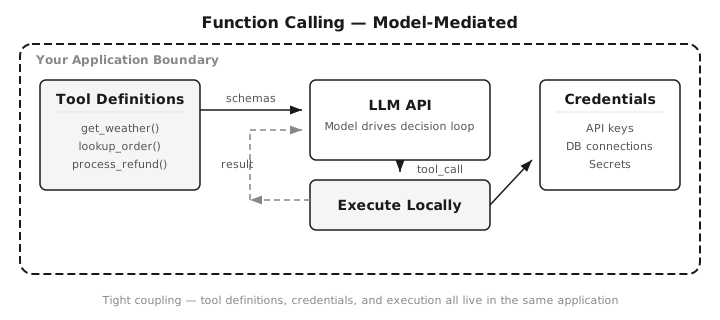
Function calling is a model feature. You define tools in your application code, and the framework converts them into JSON schemas that get sent with every API call. The model decides which tool to call and with what arguments. Your application executes the function and returns the result.
# Function calling (Strands Agents SDK)
from strands import Agent, tool

@tool
def get_weather(city: str) -> str:
    """Get current weather for a city."""
    return fetch_weather_api(city)

agent = Agent(tools=[get_weather])
response = agent("What's the weather in Tokyo?")
Every provider implements the protocol slightly differently: OpenAI uses tool_calls, Claude uses tool_use, Gemini has its own format. But SDKs like Strands abstract that away.
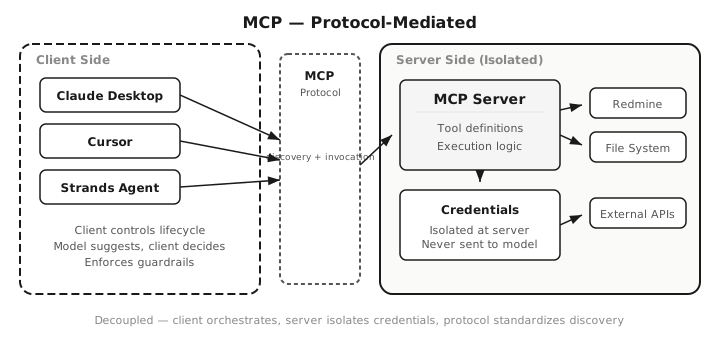
MCP (Model Context Protocol) is an open standard. Instead of defining tools inline with your API call, you run a separate server that exposes tools through a standardized protocol. Any MCP-compatible client (Claude Desktop, Cursor, your custom agent) can discover and use those tools automatically.
# MCP server - tool lives here, separately from any client
from fastmcp import FastMCP

mcp = FastMCP("Weather")

@mcp.tool
def get_weather(city: str) -> str:
    """Get current weather for a city."""
    return fetch_weather_api(city)
The tool is defined once on the server. Any MCP-compatible client (Claude Desktop, Cursor, Strands Agents, your own scripts) discovers and uses it automatically, without duplicating the tool definition.
It’s the difference between embedding SDK calls directly in your app versus exposing a service behind a standardized interface. Same capability, different architecture.
The Real Differences
Most comparisons give you a feature table and stop there. Here’s what actually matters when you’re building.
The core distinction is simple:
Function calling is model-mediated. The model sees tool schemas inside the prompt and drives the execution loop.
MCP is protocol-mediated. The client orchestrates tool discovery and execution through a protocol. The model only suggests which tools to use.
In other words: function calling is a model feature. MCP is an infrastructure layer. Confusing the two leads to architectural friction. That framing clarifies most of the differences below:
Coupling
Function calling embeds tool definitions in every API call. Your application owns the schema, the execution logic, and the error handling. Change a tool? Redeploy your app.
MCP separates the tool from the application. The server defines its own capabilities. Clients discover them at runtime. I can update my pdf-mcp server without touching any of the clients that use it.
Portability
With function calling, your tools only work inside the application that defines them. An agent SDK like Strands abstracts away model differences, but the tools still live in that one codebase. Want to reuse the same tool in a different agent or project? You’re copying code.
With MCP, I built a notes server once and it works in Claude Desktop, Claude Code, Cursor, and my own Python scripts without changes. The portability isn’t about switching models, it’s about switching clients.
Security
With function calling, your application handles credentials, API keys, and execution logic directly, often in the same codebase the model interacts with. If prompts leak, your tool surface and internal logic are exposed together.
MCP isolates credentials on the server side. The AI never sees raw API keys, never bypasses permission checks. When I built pdf-mcp, the server handles file system access, and Claude only sees the extracted text. The tool definitions are still visible to the model (that’s how it knows what to call), but the secrets stay behind the server boundary. That said, MCP servers introduce their own attack surface. When I audited pdf-mcp, I found SSRF, path traversal, and prompt injection vectors that would not exist if the tools were embedded directly in an agent via function calling.
Orchestration Control
With function calling, the model drives tool invocation decisions inside its reasoning context. It selects the tool, generates the arguments, and your app executes. The model owns the loop.
With MCP, the client controls the tool lifecycle. The model suggests; the client negotiates, enforces permissions, and decides what actually runs. That distinction matters when building systems that require stronger guardrails or deterministic enforcement, which is why MCP fits better in multi-team environments where tool governance and access control can’t live inside a prompt.
Overhead
Function calling is lighter. There’s no separate process, no protocol negotiation. For a quick prototype with two or three tools, it’s the shortest path to working code.
MCP adds a server process and a protocol layer. On stdio transport, the overhead is negligible. On HTTP, it depends on your infrastructure. Token cost is worth noting too: every tool definition consumes context tokens whether or not the model uses it. Large MCP servers can expose dozens of tools. If your client injects all tool schemas into the prompt, that can easily consume several thousand tokens before the agent even starts reasoning. This applies to function calling as well, but MCP servers tend to expose more tools by default, so the token budget adds up faster if you’re not selective about which servers you connect.
When to Use Function Calling
Use function calling when:
- You’re prototyping and want the simplest setup
- You have 2-5 tools that are tightly coupled to your application logic
- Latency matters and you want the shortest possible loop
- Your tools are internal, not shared across projects
Example: A customer support bot that looks up order status and processes refunds. The tools are specific to your app, used by one application, and change when your app changes. Function calling keeps everything in one codebase.
When to Use MCP
Use MCP when:
- You want the same tools to work across multiple clients
- You’re building tools that other developers (or other projects) will reuse
- You need credential isolation so the AI can’t see API keys or internal endpoints
- You’re integrating with 5+ external services and don’t want to manage N×M connections
Example: I built pdf-mcp as an MCP server for reading large PDFs. Without changing a single line of server code, it works in Claude Desktop for daily use, Cursor for coding tasks, and my custom Strands agents for automated workflows. One tool, three clients. That’s the payoff of MCP’s decoupled architecture.
The Hybrid Approach (What I Actually Run)
Here’s what most comparison articles miss: you don’t have to choose one. The mistake most teams make is treating MCP as a replacement for function calling. It isn’t. It’s a different layer in the stack.
The Redmine migration I mentioned up top took about a day. The tool logic barely changed. What changed was the boundary:
# Before: tool defined inside Agent A's codebase
# When Agent B needed it, I copied this entire block
@tool
def create_ticket(
    project: str, subject: str, description: str
) -> dict:
    """Create a Redmine ticket."""
    return redmine.issue.create(
        project_id=project,
        subject=subject,
        description=description,
    )
# After: tool lives on the MCP server
# Both agents connect as clients. One definition.
@mcp.tool
def create_ticket(
    project: str, subject: str, description: str
) -> dict:
    """Create a Redmine ticket."""
    return redmine.issue.create(
        project_id=project,
        subject=subject,
        description=description,
    )
No duplicated credentials. No syncing tool definitions across codebases. When I updated the ticket schema, I changed it in one place.
In production now, I use both:
- MCP for reusable integrations: ticketing (Redmine), PDF processing, documentation tools. Shared across multiple agents and clients.
- Function calling for app-specific logic: routing decisions, validation gates, business rules that only make sense inside one particular agent.
The pattern: MCP servers handle the “what can I connect to” question. Function calling handles the “what should this specific agent do” question.
Decision Framework
Choose MCP if:
- Multiple agents or clients need the same tools
- Tools require separate credentials or permission boundaries
- Integrations should be reusable across projects
- You’re connecting 5+ external services
Choose function calling if:
- Tools are specific to one application
- You’re prototyping and want the simplest setup
- Latency is critical and you want the shortest loop
- Tool logic changes together with the agent
If most of your answers point to MCP, start with an MCP server. If it’s mostly function calling, keep it simple. You can always extract tools into MCP servers later when the complexity justifies it.
At a Glance
| Dimension | Function Calling | MCP |
|---|---|---|
| Architecture | Model-mediated | Protocol-mediated |
| Coupling | App-level | Server-level |
| Orchestration | Model drives the loop | Client controls lifecycle |
| Reusability | Single application | Any MCP client |
| Setup Complexity | Low | Moderate |
| Credential Isolation | Limited | Strong |
| Best For | App-specific logic | Shared integrations |
Can MCP Replace Function Calling?
Not really. They solve different problems.
MCP standardizes how tools are exposed and shared across clients. Function calling controls how a specific agent invokes logic during reasoning. MCP is the integration layer. Function calling is the agent logic layer.
In practice, most production systems use both. Trying to force everything into MCP adds unnecessary infrastructure for app-specific logic. Trying to keep everything as function calling leads to the duplication problem I hit with Redmine.
What’s Next
MCP is quickly moving from experimentation to infrastructure. When multiple agents need the same integrations, copying tool definitions across codebases stops scaling. MCP servers become the shared layer that agents plug into. The ecosystem has over 12,000 servers available, and the spec continues to evolve.
Function calling isn’t going away. It’s still the fastest path for simple integrations. But if you’re building anything that needs to scale across tools, clients, or teams, MCP is the foundation to build on.
AI Agent Architecture

Agent Logic Layer
  └── Function Calling
        - routing decisions
        - validation gates
        - business rules

Integration Layer
  └── MCP Servers
        - Redmine (ticketing)
        - pdf-mcp (documents)
        - internal APIs
For platform engineering teams, this split is especially compelling. Instead of each squad embedding credentials and tool logic into their agents, you publish governed MCP servers with consistent access control, audit logging, and versioning. The tools become a platform service, not copy-pasted code.
If you’re new to MCP, start with What Is MCP? The Universal Connector for AI Agents for the conceptual foundation. When you’re ready to build, my step-by-step MCP server tutorial gets you a working server in under 100 lines of Python. And before you ship anything to production, read 8 vulnerabilities I found in my own MCP server.
Whichever approach you choose, the tools are only half the problem. For runtime safety patterns (circuit breakers, validation, budget guardrails), see AI Agent Error Handling. For catching failures before deploy, see Testing AI Agents in Production.





Discussion
Comments are powered by GitHub Discussions. Sign in with GitHub to join the conversation.